WordPress API integration services for agencies
WordPress API integration for your clients’ sites: CRM, payment provider and business tools connected, built by us and delivered under your brand.
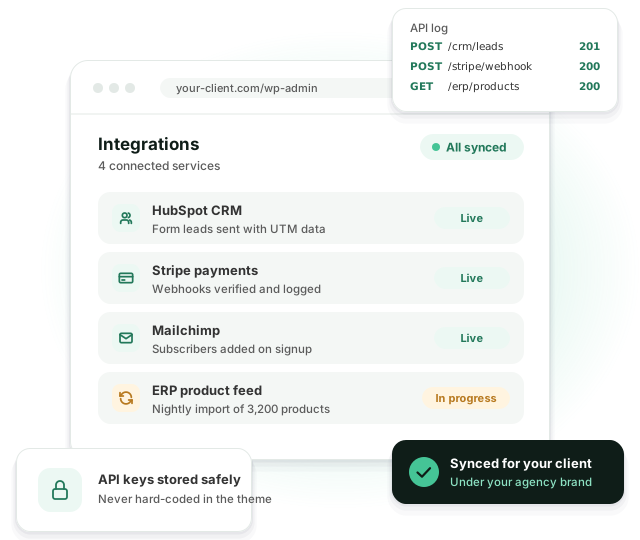
Leads land in the CRM, orders reach the ERP, and nobody copies data between tabs. When a sync fails, someone gets an alert instead of finding out a month later.
Why integrations cause trouble
-
 Clients copy data between systems by hand
-
 Leads and orders go missing between tools
-
 Connector plugins can’t handle the client’s logic
-
 A sync fails silently and nobody notices
-
 API keys end up in the theme code
-
 Your team hasn’t built API integrations before
An integration is only useful if it works every time, and tells you when it doesn’t.
What we connect
Almost any service with a documented API.
CRMs
HubSpot, Salesforce, Pipedrive and others, with form leads and UTM data sent automatically.
Payments
Stripe, PayPal and regional providers, with verified webhooks for payments and refunds.
Email marketing
Mailchimp, Klaviyo, ActiveCampaign and others, triggered by signups, purchases or forms.
ERP and inventory
Products, stock and orders synced between WooCommerce and the client’s ERP.
Your own endpoints
Custom REST API endpoints for mobile apps, headless front ends and partner systems.
Logs and alerts
Every request logged, with an alert when a sync fails, so you fix it before the client asks.
Integrations we build most often
Each one looks simple in a sales call. The detail below is where the hours go. For the technical side, read our guide to integrating third-party APIs with WordPress.
HubSpot
Form entries become contacts with UTM source and lifecycle stage, and the contact owner is set by region. No duplicate contacts when someone fills in two forms.
Salesforce
Web-to-Lead swapped for the REST API, so custom fields, record types and duplicate rules actually work.
ERP and inventory
Stock and prices pulled from the ERP every 15 minutes. Paid WooCommerce orders pushed back with the client’s SKUs and tax codes.
Stripe and payments
Subscriptions, refunds and failed payments handled through signed webhooks. Card data never touches the WordPress server.
Booking and calendars
Availability read from the client’s booking system, so the site never offers a slot that’s already taken.
Shipping
Live rates and label creation through ShipStation, Shippo or a carrier’s own API, with fallback rates if the API is slow.
What happens when an API call fails
APIs time out, rate-limit and change. Most of the work in a good integration is in handling that.
Queued, not blocking
Syncs run in a background queue (Action Scheduler). A slow CRM never makes a visitor wait on the form or the checkout.
Retries
Failed calls are retried with increasing delays. A short outage on the other side fixes itself.
No duplicates
Each record carries an ID the other system can check, so a retry updates the record instead of creating a second one.
Logs you can read
An admin screen with recent requests, responses and errors. Your team can answer “did that lead go through?” in a minute.
Alerts
If a sync keeps failing, an email or Slack message goes to whoever you choose.
API keys and client data
The parts that matter in a security review.
- Keys live in wp-config.php or environment variables, never in the theme or in Git
- Each key gets the narrowest permissions the integration needs
- Incoming webhooks are checked against their signature before anything runs
- Only the fields the other system needs are sent, which keeps GDPR reviews short
How we build a WordPress API integration
-
1. Map the data
Which system owns which data, what triggers a sync and what should happen when it fails.
-
2. Spec and quote
We read the API docs, check the rate limits and send a short spec with a fixed price.
-
3. Build on sandboxes
We build on staging with sandbox accounts and test the failure cases, not only the happy path.
-
4. Go live and watch
We deploy, watch the first syncs and hand over docs your team can share with the client. Bugs found in the first 30 days are fixed at no extra cost.
Example: a B2B store connected to HubSpot and an ERP
A typical project for a WooCommerce agency with a wholesale client.
-
The problem
Sales staff re-typed every web order into the ERP. Stock on the site was a day behind, and leads from three forms landed in a shared inbox.
-
What we built
Stock and customer price lists pulled from the ERP every 15 minutes, paid orders pushed back automatically, and all three forms sent to HubSpot with UTM data.
-
Effort
About 60 hours, including a staging copy of the ERP connection and a week of parallel running before the switch.
-
After launch
Two mapping fixes in the first month, both covered by the 30-day bug fix period. Since then, the log screen is where the client’s team looks first.
Agencies that send us integration work
Mostly agencies whose clients sell B2B or run WooCommerce stores with an ERP behind them.
- Agencies with B2B and lead generation clients
- WooCommerce agencies syncing with an ERP
- Marketing agencies connecting CRMs and ad platforms
- Agencies building client portals
- Teams without a backend developer
- Agencies replacing fragile connector plugins
API integration FAQ
Almost any service with a documented API: CRMs, payment providers, email platforms, ERPs, booking tools and custom systems.
A reliable plugin when one fits, custom code when the logic is specific to your client’s business. Often a mix of both.
Bugs in the first 30 days after launch are on us. After that, a retainer covers monitoring and updates, so an API change doesn’t break the client site. Most providers announce breaking changes months ahead, and we plan around them.
Yes. We build custom REST API endpoints for mobile apps, headless front ends and partner systems.
In the server configuration or environment variables. Never in the theme, and never in Git.
Related services
Which systems need to talk to each other?
Tell us, and we’ll send a short spec and a quote. We reply within one business day.