Development Retainer vs Hourly Billing: How Agencies Should Buy WordPress Work
The development retainer vs hourly question comes down to one number and one less obvious factor. The number is how many of the reserved hours you’d actually use. The factor is what a delay costs you when your task sits in a queue behind someone else’s.
We sell both, so we don’t have much reason to push you one way. Our WordPress retainer packages and on-demand development use the same developers. Plenty of agencies should stay on hourly for a long time, and we’ll tell you how to spot that.
Development retainer vs hourly: how each one works
With a development retainer, you pay a fixed monthly fee for a set block of developer hours. In return, the provider reserves that capacity for you, usually at a lower rate than hourly, and your tasks get priority over ad-hoc work.
The word “reserved” is what you’re paying for. The provider schedules around your hours, turning down other work if necessary. That’s why most retainers have a minimum term and limited or no rollover. Ours come in 5, 15 and 30 hours a month, with a 3-month minimum and 30 days’ notice to cancel after that.
Hourly billing, also known as on-demand or time and materials, has no such commitment. You send a task, you approve an estimate, you pay for time spent. Nothing is reserved, so your work goes in the queue with everyone else’s. Ours has a one-hour minimum and tracks time in 15-minute steps, with non-critical work starting within 24 working hours.
When hourly is cheaper
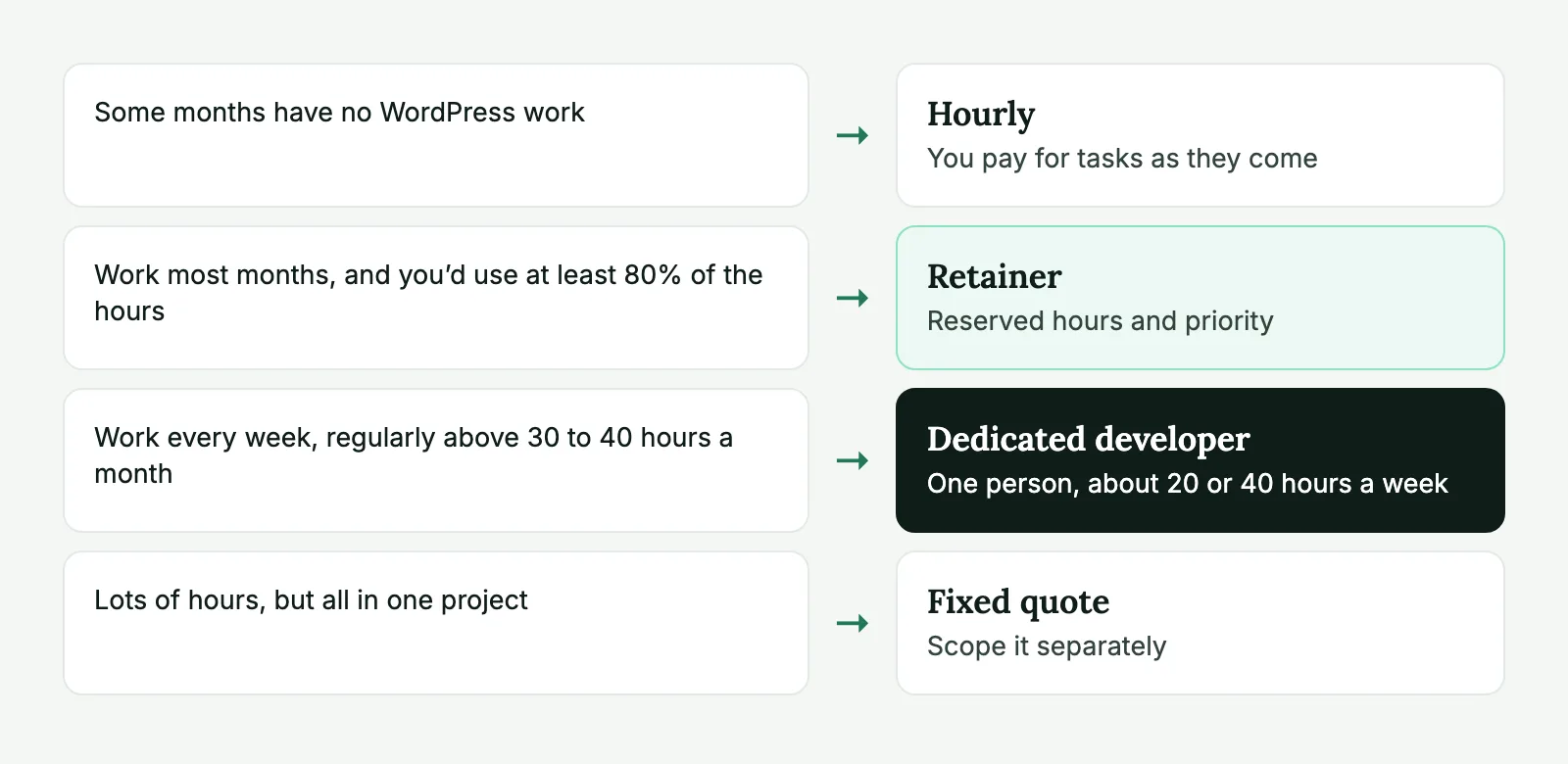
Hourly wins whenever your work is irregular. Three clear signals:
- Some months have no WordPress work at all.
- Your tasks come in clusters tied to campaigns or launches.
- You can’t say with confidence how many hours you used last quarter.
Now the math. A retainer’s discount only pays off if you use enough of the hours. Say a retainer rate is 15% below the hourly rate. (That’s a round number for the calculation, not our pricing. Plug in the real quotes you get.) Measured in “hours at the hourly rate”, it looks like this:
| Retainer size | Monthly cost, in hourly-rate hours | Break-even: use at least | Saved if you use all of it |
|---|---|---|---|
| 10 hours | 8.5 | 8.5 hours | 1.5 hours’ worth |
| 20 hours | 17 | 17 hours | 3 hours’ worth |
| 40 hours | 34 | 34 hours | 6 hours’ worth |
So on a 20-hour retainer with this discount, a 12-hour month costs you the equivalent of 5 extra hours, and a full month saves you 3. One quiet month wipes out most of what two full months saved. The formula is simple: break-even usage = 1 − discount. With a 10% discount, you need to use 90% of the hours. With 25%, you need 75%.
If the math were the whole story, you could stop here, but the discount is usually not why agencies move to a retainer.
What the numbers leave out
Queue time costs something, even though it doesn’t appear on an invoice. If a client’s request waits two days and your account manager has to chase it twice, you’ve paid for that in staff time and goodwill. A retainer also buys continuity. The same people stay on your sites, so nobody spends 30 minutes rediscovering how a client’s custom checkout works. That shows up as fewer hours per task over time, and it isn’t in the table above.
There’s also a psychological effect, and it cuts both ways. With hours already paid for, teams stop hesitating over small improvements, and sites get better. But if hours are feeling “free”, people also send vague tasks and let scope drift. Good reporting helps with that.
At the other end, once you’re regularly above about 30 to 40 hours a month, take a look at a dedicated developer. You get one person at about 20 or 40 hours a week, and you’ll probably spend less time on task management.
Sending WordPress tasks every week? Our retainer packages reserve 5, 15 or 30 developer hours a month, with priority over ad-hoc work.
Sizing a retainer
Don’t guess. Pull the last six months of invoices or time logs and write down the WordPress hours per month. Example:
| Month | Hours |
|---|---|
| January | 11 |
| February | 16 |
| March | 9 |
| April | 22 |
| May | 14 |
| June | 13 |
The average is 14.2, the median is 13.5, and the peak is 22. For this agency, we’d suggest 15 hours and paying on-demand for the extras in a month like April. A 30-hour plan would cover the peak, but it would waste about half of the time paid for in most months. A 5-hour plan would leave too much work outside the priority queue.
The general rule: size for a normal-to-slow month, not for your peak. Moving up is painless. Paying for time you don’t use, every month, is how a retainer gets cancelled.
Fixed work helps, too. Count what recurs on its own: updates, monitoring, reports, small content changes. If you have six client sites and updates take about 2 to 3 hours a month across them, that’s your base. Anything on top of it is variable. If the base already fills most of the plan, you don’t have room for new requests, so size up.
Run a trial if you can’t decide. A 3-month minimum isn’t a huge bet on a small plan, and three months of real data beats any spreadsheet.
Rollover and unused hours
This is where retainer disputes usually start, so settle it before signing. There are three common models:
No rollover. Hours are reserved time. If you don’t use them, they expire. That’s how ours work, and in a quiet month we’ll suggest planned work, such as audits or small improvements, so the hours aren’t wasted.
Limited rollover. Unused hours carry forward for one month, or up to a cap. It’s friendlier, and it usually comes at a higher rate, since the provider is taking on the scheduling risk.
Full rollover. A prepaid bank of hours. It’s essentially hourly billing with money up front, so don’t expect true priority.
There isn’t a morally correct option. Just ask two questions: how many hours could pile up, and can they all be spent in one week? A provider that promises unlimited rollover and also guaranteed availability is promising something it can’t deliver.
What to put in the agreement
A retainer agreement doesn’t need to be long, but it should answer each of these. You can use this as a template:
Hours:          [15] hours per calendar month, tracked in [15]-minute steps
Term:           [3]-month minimum, then [30] days' written notice
Unused hours:   [Do not carry over / Carry over one month, up to X hours]
Extra hours:    Billed at [rate]; approval needed above [X] hours
Response:       Reply within [a few] working hours; non-critical work starts
                within [24] working hours
Urgent issues:  Site down: start within [1] working hour
Working hours:  [Days, hours, time zone]; what happens outside them
Included:       Development, fixes, updates, reviews, communication [yes/no]
Excluded:       Licenses, hosting, third-party fees, projects over [X] hours
Reporting:      Monthly report per task and per site, branded or unbranded
Ownership:      Code and access belong to [agency/client] on payment
Confidentiality: NDA terms; no contact with end clients
Changing size:  Up or down from the next month, with [X] days' notice
Ask about two lines in particular. “Included” tells you whether internal communication eats your hours. “Excluded” stops a big project from quietly consuming the whole plan. Larger jobs are better quoted separately, so a month’s retainer doesn’t vanish into a single feature.
Reselling retainers to clients
If you’re an agency, this is the most interesting part, because you can buy on one model and sell on another.
Most agencies sell clients a fixed-fee monthly plan, then buy development hours in a single block across all of them. Example: you have eight clients on care plans. Each gets updates, monitoring and up to a set amount of small changes. Some send nothing in a given month, and others use their full allowance. Your 30-hour retainer sits across the eight of them, and the slow accounts cover the busy ones. That’s your margin, and it’s more predictable than selling hours one-to-one.
Three things keep it healthy:
Sell outcomes rather than hours when you can. “Your site stays updated and we handle small changes” is easier to buy, and it doesn’t invite the client to audit your time. Our guide to WordPress care plans gets into the packaging.
Put a limit on your promise. Define what “small changes” means, or a single client’s redesign request will land in your care plan.
Set response times you can keep. If your partner promises a first reply within a few working hours, don’t promise your clients 30 minutes. Keep some buffer for your own team’s review.
Unbranded reports make this work smoothly. Ours come with your logo or no branding, so a client sees your name and a list of what got done.
If you’re still not sure which model fits, send us a rough idea of your last few months. We’ll tell you what we’d pick, even if it’s plain hourly.
Retainer FAQ
Only if you use most of the hours. The break-even depends on the discount: at 15% off the hourly rate, you need to use 85% of the reserved hours before the retainer pays for itself. Below that, hourly costs less.
It depends on what you’re buying. If it’s a reserved developer’s time, rollover rarely fits, because the developer was available and that time is gone. Some providers allow a limited carryover for a higher rate. What matters is that the rule is written down before the first month.
Add up the last six months of WordPress work and size to a slow-to-normal month, not your busiest. Send the extra in busy months at your overage rate. Moving up after two or three months is easy.
Yes, and many agencies do, usually as a care plan with a fixed monthly fee. You pay for hours across all your clients and sell each client a plan, so unused time on one site can cover another.