AI Crawlers and JavaScript: We Tested What Elementor, Kadence and Spectra Show Them

The usual warning about AI crawlers and JavaScript goes like this: AI crawlers don’t run scripts, page builders load content with scripts, so page builder sites are invisible to ChatGPT. We had repeated a version of it ourselves. Then we checked 33 agency homepages and found JavaScript-only content on just three of them, which didn’t fit the story. So we built a test.
On a clean WordPress install we added 14 common widgets from Elementor, Kadence Blocks, Spectra and WordPress core, each with its own unique sentence or number, and fetched the pages the way an AI crawler does: plain HTML, no JavaScript. Tabs, accordions and sliders passed. Counters failed, in all three builders. The fix is a short mu-plugin, which we tested too.
This test is part of our AI search optimization for WordPress work. If a client’s site uses animated stats, it applies to them.
Do AI crawlers run JavaScript?
As far as anyone can show, mostly no. Vercel and MERJ analyzed AI crawler traffic across Vercel’s network in December 2024 and found that none of the major AI crawlers rendered JavaScript, including GPTBot, OAI-SearchBot, ChatGPT-User and ClaudeBot. Googlebot does render, which is why Google’s AI Overviews are less of a worry here.
Since September 2026 a few site owners have reported OAI-SearchBot fetching scripts and possibly rendering. OpenAI hasn’t said anything. So we looked at our own static file logs for October 17 to November 16, keeping only requests from OpenAI’s published IP ranges:
| Bot (verified IPs only) | JS and CSS requests in 31 days | What else it fetched |
|---|---|---|
| OAI-SearchBot | 0 | Images, robots.txt, the two fonts we preload in the HTML |
| GPTBot | 21 | Mostly SVG icons |
| Googlebot | 52 | Images, PDFs |
The GPTBot number looks like rendering until you read the file names. It fetched gsap.min.js and custom-spaces.css, two files our pages no longer load. A renderer only loads what the current page asks for. GPTBot was working through a list of URLs it had collected earlier, the same way it fetches images. Googlebot, by contrast, fetched our current stylesheet and scripts together with the pages, which is what rendering looks like in a log.
So for planning, assume AI crawlers read the HTML your server sends and nothing a script adds later.
How we tested
- A clean WordPress 7.1.4 install on SQLite, Twenty Twenty-Five theme, nothing else added.
- Elementor 4.4.0, Kadence Blocks 3.9.1 and Spectra 2.20.6, the current versions on wordpress.org on November 16, 2026.
- Elementor widgets built from Elementor’s own page data, so Elementor generated the markup. Block widgets inserted and saved through the block editor, so each plugin’s own save code produced the HTML.
- Every widget got a unique marker sentence, and every counter was set to count from 0 to 347.
- Each page fetched twice: with
curl, which is roughly what an AI crawler gets, and with headless Chrome after scripts ran.
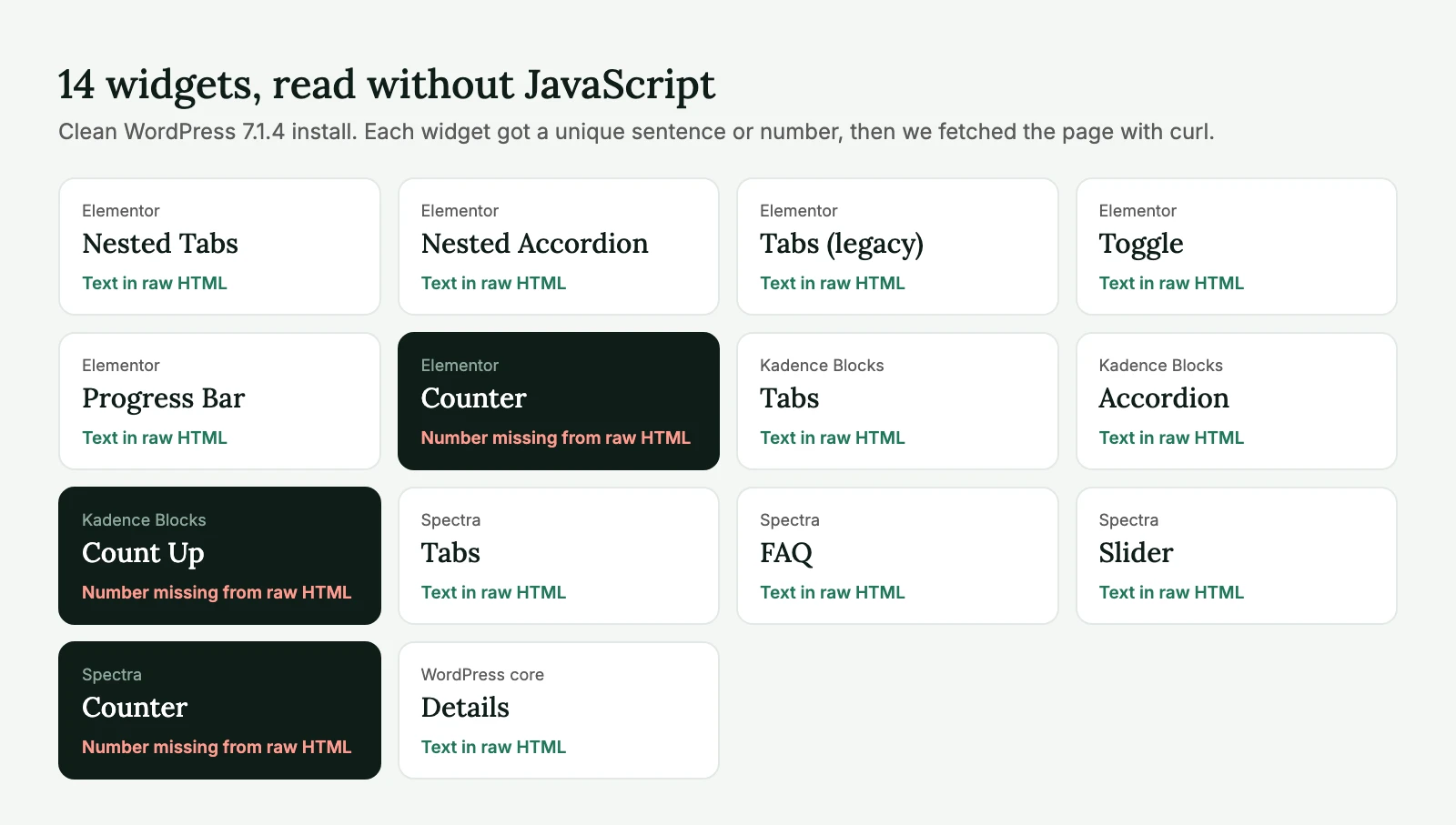
| Builder | Widget | In the raw HTML? |
|---|---|---|
| Elementor 4.4.0 | Nested Tabs | Yes, all panels |
| Elementor 4.4.0 | Nested Accordion | Yes, all items |
| Elementor 4.4.0 | Tabs (legacy) | Yes |
| Elementor 4.4.0 | Toggle | Yes |
| Elementor 4.4.0 | Progress Bar | Yes, “96%” as text |
| Elementor 4.4.0 | Counter | No: shows “0”, value in data-to-value |
| Kadence Blocks 3.9.1 | Tabs | Yes, all panels |
| Kadence Blocks 3.9.1 | Accordion | Yes, all panes |
| Kadence Blocks 3.9.1 | Count Up | No: empty, value in data-end |
| Spectra 2.20.6 | Tabs | Yes, all panels |
| Spectra 2.20.6 | FAQ | Yes, all answers |
| Spectra 2.20.6 | Slider | Yes, all slides |
| Spectra 2.20.6 | Counter | No: empty, value in data-to-value |
| WordPress 7.1.4 | Details | Yes |
Tabs, accordions and sliders are fine
All 11 text widgets had their full text in the raw HTML: Elementor’s Nested Tabs, Nested Accordion, legacy Tabs and Toggle, Kadence’s Tabs and Accordion, Spectra’s Tabs, FAQ and Slider, and the core Details block. The hidden panels are hidden with CSS. The text is in the page from the start, and JavaScript only switches which panel you see.
That means the common advice to “take content out of tabs for AI” is wrong for these builders. A crawler that reads HTML gets every panel. Google has said for years that it indexes content in tabs normally on mobile-first sites, and AI crawlers have even less reason to care about CSS.
The Elementor Progress Bar passed as well: “96%” is in the HTML as text.
Counters are not
Here’s what the three counters looked like in the raw HTML:
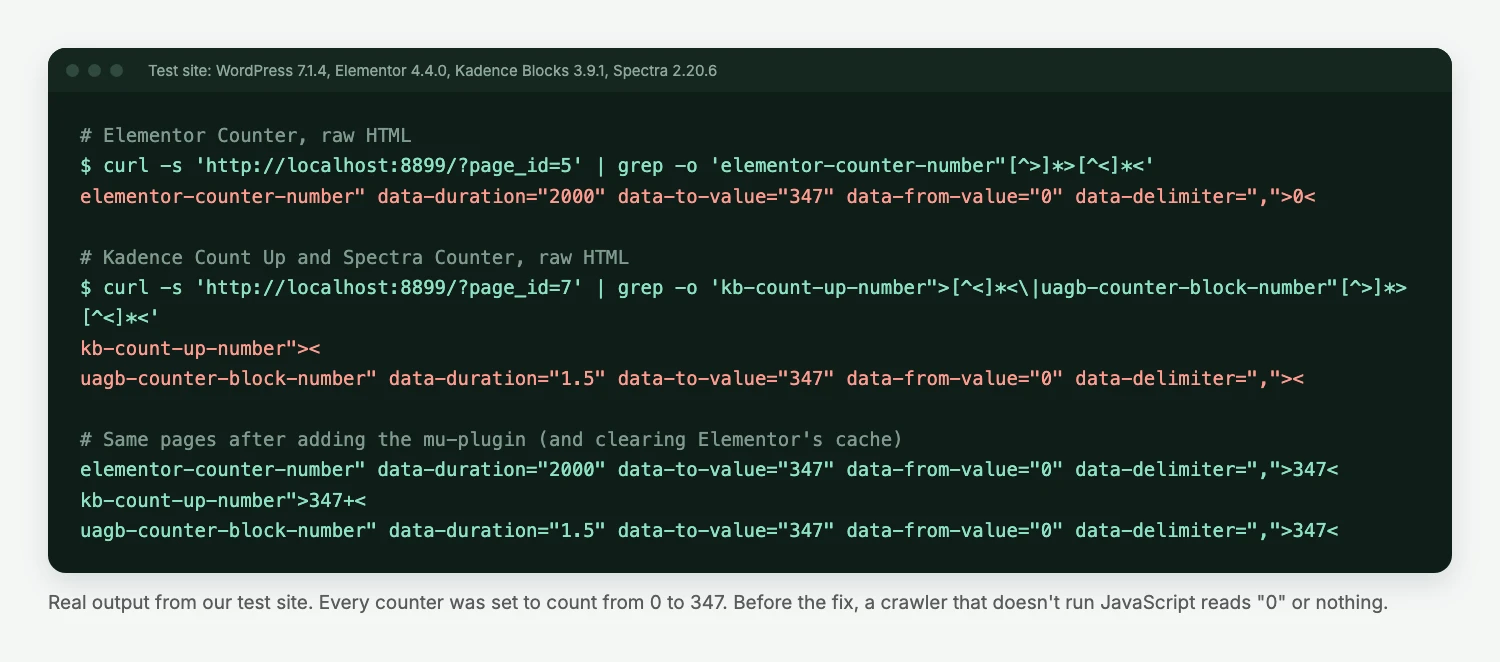
- Elementor Counter puts
0in the number element. The real value, 347, sits in adata-to-valueattribute that a script reads later. A crawler reading text sees “0+ sites launched”. - Kadence Count Up leaves the number element empty and keeps the value in
data-end. After its script runs, Kadence adds a screen-reader copy of the final number, but only then. - Spectra Counter does the same as Elementor, with an empty element instead of a 0.
In headless Chrome it got worse before it got better. With a normal 1280×900 window, all three counters were still at 0 after ten seconds, because they only start counting when scrolled into view. Only with a 9,000-pixel-tall window did the real numbers appear. A crawler that does render a page usually doesn’t scroll it.
Counters matter because of what they hold. On agency and service sites they carry the claims that answer questions directly: years in business, projects delivered, clients served, response times. Those are the sentences AI answers like to quote, and they’re exactly the ones that disappear.
The 33 agency homepages we checked earlier back this up. Three had animated stats. On one, a GreenShift counter block showed “0” in the HTML where visitors eventually see “17+ years fixing WordPress” and “100% WordPress experts”. On another, a custom script left the market figures empty until it ran. The third did it right: the numbers were already in the HTML, and the script only animated them.
Not sure what a client’s homepage looks like without JavaScript? Our free AI readiness audit compares the raw HTML with what visitors see on the key pages, and you get the report under your agency’s name.
The fix: put the final number in the HTML
You can keep the animation. The number just needs to be in the HTML before the script runs. This mu-plugin does that for all three builders. Save it as wp-content/mu-plugins/counter-numbers-in-html.php:
<?php
/**
 * Plugin Name: Counter numbers in HTML
 * Description: Writes the final number of Elementor, Kadence and Spectra counters into the HTML,
 *              so crawlers that don't run JavaScript see "347+" instead of "0" or nothing.
 */

// Elementor Counter widget: the span holds "0", the real value is in data-to-value.
add_filter( 'elementor/widget/render_content', function ( $content, $widget ) {
	if ( 'counter' !== $widget->get_name() ) {
		return $content;
	}
	return preg_replace_callback(
		'#(<span class="elementor-counter-number"[^>]*data-to-value="([^"]*)"[^>]*>)[^<]*(</span>)#',
		fn( $m ) => $m[1] . esc_html( $m[2] ) . $m[3],
		$content
	);
}, 10, 2 );

// Kadence Count Up and Spectra Counter blocks: the number element is empty.
add_filter( 'render_block', function ( $html, $block ) {
	if ( 'kadence/countup' === $block['blockName'] && preg_match( '#data-end="([^"]*)"#', $html, $end ) ) {
		preg_match( '#data-prefix="([^"]*)"#', $html, $pre );
		preg_match( '#data-suffix="([^"]*)"#', $html, $suf );
		$value = ( $pre[1] ?? '' ) . $end[1] . ( $suf[1] ?? '' );
		return preg_replace( '#(<div class="kb-count-up-process kb-count-up-number">)(</div>)#', '${1}' . esc_html( $value ) . '${2}', $html, 1 );
	}
	if ( 'uagb/counter' === $block['blockName'] ) {
		return preg_replace_callback(
			'#(<span class="uagb-counter-block-number"[^>]*data-to-value="([^"]*)"[^>]*>)(</span>)#',
			fn( $m ) => $m[1] . esc_html( $m[2] ) . $m[3],
			$html
		);
	}
	return $html;
}, 10, 2 );
What we saw after adding it on the test site:
- Kadence and Spectra showed
347+and347in the raw HTML straight away. - Elementor still showed
0. Elementor caches the rendered output of widgets, so the filter never ran. After Elementor → Tools → Clear Files & Data, the raw HTML had347. - The animation still works. The counters show the real number on load, then count up from 0 when scrolled into view, as before.
The regular expressions match the markup of the versions above. Builders change their HTML between major versions, so after an update, run the curl check below again. If you’d rather not depend on markup at all, replace counters on key pages with plain headings. “347+ sites launched” as text needs no plugin.
What we didn’t test
We kept the test to widgets whose content is typed into the page. Some content loads with JavaScript by design, and you should assume crawlers don’t see it:
- review, Instagram and booking widgets that pull content from another service;
- “load more” buttons and infinite scroll in post lists (Elementor’s are in Pro, which we didn’t test);
- pages where the theme or a headless front end builds the content in the browser.
We also didn’t test Divi, Bricks or Oxygen. Bricks powers one of the 33 agency sites we checked, and its homepage passed. That’s one data point, not a test.
Check a client’s site in two minutes
Fetch the page as plain HTML and look for the claims that matter. This shows every counter-style value a page keeps in data- attributes, and what’s actually written in the element:
curl -s https://client-site.com/ | grep -oE 'data-(to-value|end|target)="[0-9.,]+"[^>]*>[^<]{0,12}<'If a line ends in >0< or ><, that number isn’t in the HTML. Then search the source for one sentence from each tab or accordion you care about:
curl -s https://client-site.com/services/ | grep -c "a sentence from the second tab"Zero means it’s missing. With the builders we tested, it won’t be.
Our take
Before this test we’d have told an agency to rebuild tabs and accordions for AI crawlers. We were wrong about that for Elementor, Kadence and Spectra, and we’ve corrected it on our own pages. The real problem is smaller and easier to fix: animated numbers. On most client sites that’s one mu-plugin or ten minutes of replacing counters with headings, and the homepage’s strongest claims become readable to every crawler. It’s also a quick win you can show a client in a before-and-after curl.
If you want us to run these checks on your client sites, send us a URL. For the rest of the access side, see how to get a WordPress site cited by ChatGPT and our guide to AI crawlers and robots.txt.
AI crawlers and JavaScript: FAQ
The evidence says mostly no. Vercel and MERJ found no JavaScript rendering by major AI crawlers in 2024. In our own logs for October to November 2026, verified OAI-SearchBot requested no scripts or stylesheets at all. Plan as if they read only the HTML the server sends.
Yes, in our test. Elementor’s Nested Tabs, Nested Accordion, Tabs and Toggle all had their full text in the raw HTML. The same was true for Kadence and Spectra tabs, accordions and sliders, and the core Details block.
Elementor, Kadence and Spectra counters keep the final number in a data attribute and let JavaScript write it into the page. Without JavaScript the element shows 0 or nothing. A small mu-plugin can write the final number into the HTML, and the animation keeps working.
Googlebot renders JavaScript, but counters only start when scrolled into view. In our headless Chrome test with a normal window, all three counters still showed 0 after ten seconds. Putting the number in the HTML removes the guesswork for every crawler.
No. In our test, page builder text widgets were as readable as plain blocks. Check counters, third-party widgets and “load more” lists, and fix those.