AI Crawlers on WordPress: robots.txt, llms.txt and Cloudflare Settings Explained
We went through a month of our own server logs to see how often AI crawlers read deviart.agency. The answer was interesting, but the bigger surprise was who else showed up. About a third of the requests that called themselves GPTBot, OAI-SearchBot or ChatGPT-User came from IP addresses OpenAI doesn’t use. Every single “PerplexityBot” was fake. Most of the fakes were scanners looking for .env files and private keys.
That changes how you should read any report about AI crawlers and robots.txt, including the ones you build for clients. This guide starts with what we found in our logs, then covers the parts you need on client sites: which bots to allow, where WordPress builds robots.txt, what Cloudflare and the host do before WordPress sees a request, and what llms.txt is worth. It’s the technical half of our AI search optimization for WordPress work.
A month of AI bots on our own site
The data: Apache access logs from deviart.agency, October 17 to November 16, 2026. The site runs on Cloudways behind Cloudflare. Requests that Varnish or Cloudflare answered from cache never reach these logs, so the totals are lower than the real traffic. The split between real and fake isn’t affected by that.
We checked each request’s IP against the lists that OpenAI, Perplexity, Google and Microsoft publish for their crawlers. A user agent is just a text field anyone can set; the IP is much harder to fake.
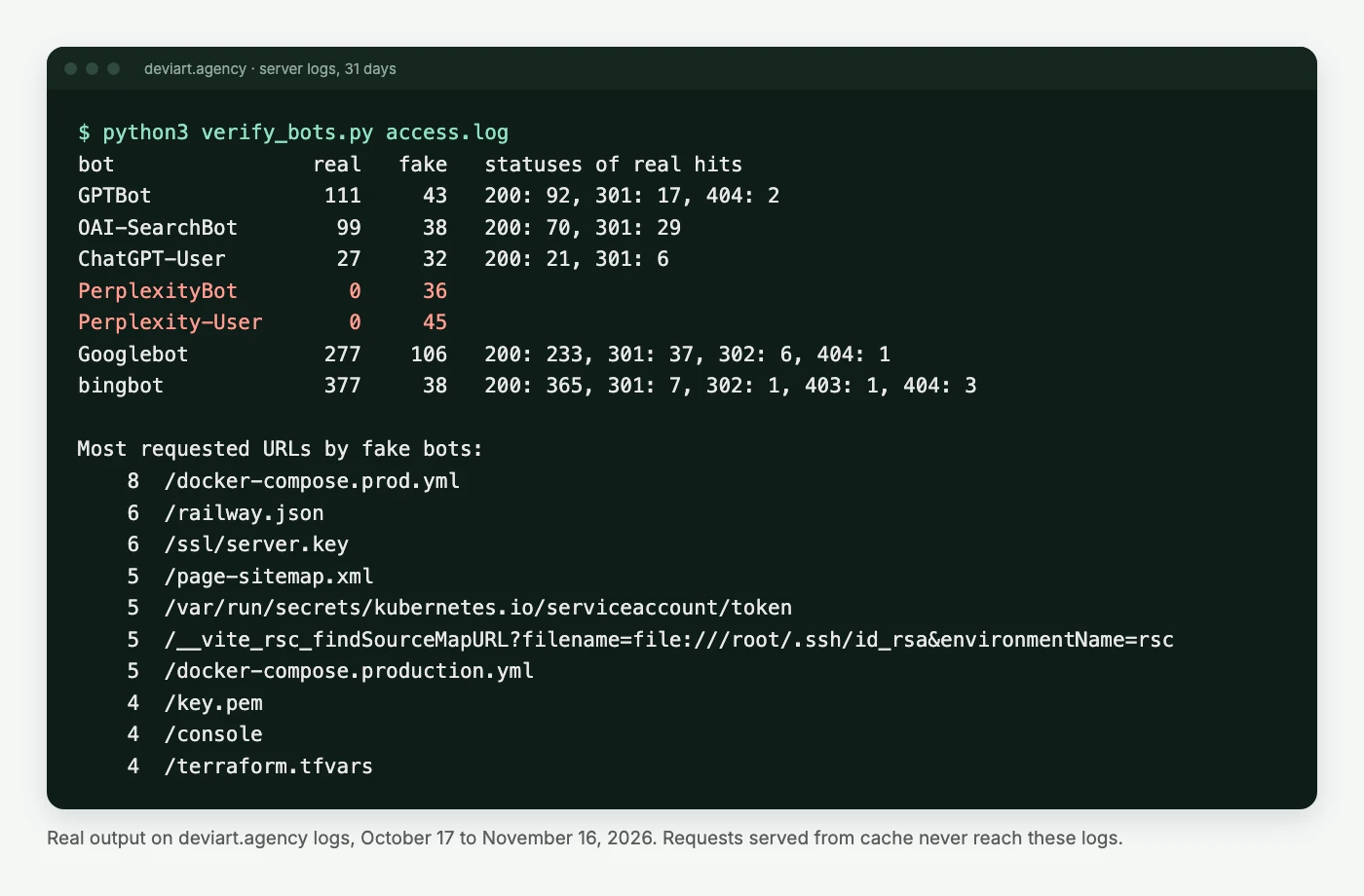
| Claimed bot | Requests | From the vendor’s IPs | From somewhere else |
|---|---|---|---|
| GPTBot | 154 | 111 | 43 |
| OAI-SearchBot | 137 | 99 | 38 |
| ChatGPT-User | 59 | 27 | 32 |
| PerplexityBot | 36 | 0 | 36 |
| Perplexity-User | 45 | 0 | 45 |
| Googlebot | 383 | 277 | 106 |
| Bingbot | 415 | 377 | 38 |
What we took from it:
- The real OpenAI crawlers behave. GPTBot spent most of its visits on
sitemap_index.xml(29 times) and then fetched pages from it. Real OAI-SearchBot got a 200 or a redirect on every request. Nothing on our side blocks them. - Real ChatGPT-User requests are the interesting ones. Each one is a person asking ChatGPT to open one of our pages. There were 27 in a month, mostly the homepage. Nine minutes after we published our AI search pages, ChatGPT-User fetched all three in the same second. Someone had pasted the links into ChatGPT, quite possibly one of us.
- The fake ones aren’t researchers. Their top requests were
/docker-compose.prod.yml,/ssl/server.key,/railway.jsonand/__vite_rsc_findSourceMapURL?filename=file:///root/.ssh/id_rsa. Someone has figured out that site owners are told to let AI bots through, and borrows their names. - Fake Googlebot is the old version of the same trick: 106 of 383 requests.
If you report “AI crawler visits” to a client from user agents alone, you’re reporting scanners too. On our site that would have inflated the OpenAI numbers by almost half.
How to check which bots are real
OpenAI, Perplexity, Google and Bing publish JSON files with their crawlers’ IP ranges. This script downloads them, reads an access log and splits each bot’s requests into real and fake. Standard library only, so it runs anywhere Python 3.8 or newer is installed:
#!/usr/bin/env python3
"""Split AI and search bot hits in an access log into real and fake.
Usage: python3 verify_bots.py access.log [more.log ...]"""
import collections, ipaddress, json, re, sys, urllib.request

RANGES = {
    "GPTBot": "https://openai.com/gptbot.json",
    "OAI-SearchBot": "https://openai.com/searchbot.json",
    "ChatGPT-User": "https://openai.com/chatgpt-user.json",
    "PerplexityBot": "https://www.perplexity.ai/perplexitybot.json",
    "Perplexity-User": "https://www.perplexity.ai/perplexity-user.json",
    "Googlebot": "https://developers.google.com/static/search/apis/ipranges/googlebot.json",
    "bingbot": "https://www.bing.com/toolbox/bingbot.json",
}
LINE = re.compile(r'^(\S+) .*?"[A-Z]+ (\S+)[^"]*" (\d{3}) .*"([^"]*)"\s*$')


def load(url):
    req = urllib.request.Request(url, headers={"User-Agent": "Mozilla/5.0 (bot IP check)"})
    data = json.load(urllib.request.urlopen(req, timeout=20))
    return [ipaddress.ip_network(p.get("ipv4Prefix") or p["ipv6Prefix"]) for p in data["prefixes"]]


nets = {bot: load(url) for bot, url in RANGES.items()}
stats = collections.defaultdict(collections.Counter)
fake_paths = collections.Counter()

for path in sys.argv[1:]:
    with open(path, errors="ignore") as f:
        for line in f:
            m = LINE.match(line)
            if not m:
                continue
            ip, url, status, ua = m.groups()
            bot = next((b for b in nets if b.lower() in ua.lower()), None)
            if not bot:
                continue
            try:
                real = any(ipaddress.ip_address(ip) in n for n in nets[bot])
            except ValueError:
                continue
            stats[bot]["real" if real else "fake"] += 1
            if real:
                stats[bot]["real " + status] += 1
            else:
                fake_paths[url] += 1

print(f"{'bot':16} {'real':>6} {'fake':>6}   statuses of real hits")
for bot in nets:
    s = stats[bot]
    codes = ", ".join(f"{k[5:]}: {v}" for k, v in sorted(s.items()) if k.startswith("real "))
    print(f"{bot:16} {s['real']:6} {s['fake']:6}   {codes}")
print("\nMost requested URLs by fake bots:")
for url, n in fake_paths.most_common(10):
    print(f"{n:5}  {url}")
Before you run it: behind Cloudflare, the log needs the visitor’s real IP, not Cloudflare’s; Cloudways and most managed hosts restore it, but check that the first column of your log isn’t always a Cloudflare address. And on Cloudways the logs live in the application’s logs folder, rotated daily, so zcat -f the .gz files into one file first.
For bots without published IPs (ClaudeBot, Claude-SearchBot, Meta’s crawlers), look at what they request. Real ones fetch sitemaps and pages. Fake ones go after config files.
Training bots, search bots and user fetchers
The rule for client sites stays simple once you know which bot does what. AI companies run separate crawlers for training, for search, and for fetching a page a user asked about:
| User agent | Owner | Job | Blocking it means |
|---|---|---|---|
| GPTBot | OpenAI | Training | Content not used to train OpenAI models |
| OAI-SearchBot | OpenAI | Search | Site not shown in ChatGPT search answers |
| ChatGPT-User | OpenAI | User fetch | OpenAI says robots.txt may not apply |
| ClaudeBot | Anthropic | Training | Future content left out of training |
| Claude-SearchBot | Anthropic | Search | Content not indexed for Claude’s search |
| Claude-User | Anthropic | User fetch | Claude can’t open pages users ask about |
| PerplexityBot | Perplexity | Search | Site not shown in Perplexity answers |
| Perplexity-User | Perplexity | User fetch | Perplexity says it generally ignores robots.txt |
| Google-Extended | Gemini training and grounding | No effect on Google Search or AI Overviews | |
| Applebot-Extended | Apple | Training | Content not used for Apple’s models |
| CCBot | Common Crawl | Open dataset | Left out of a dataset many models train on |
| Meta-ExternalAgent | Meta | Training | Content not used for Meta’s AI |
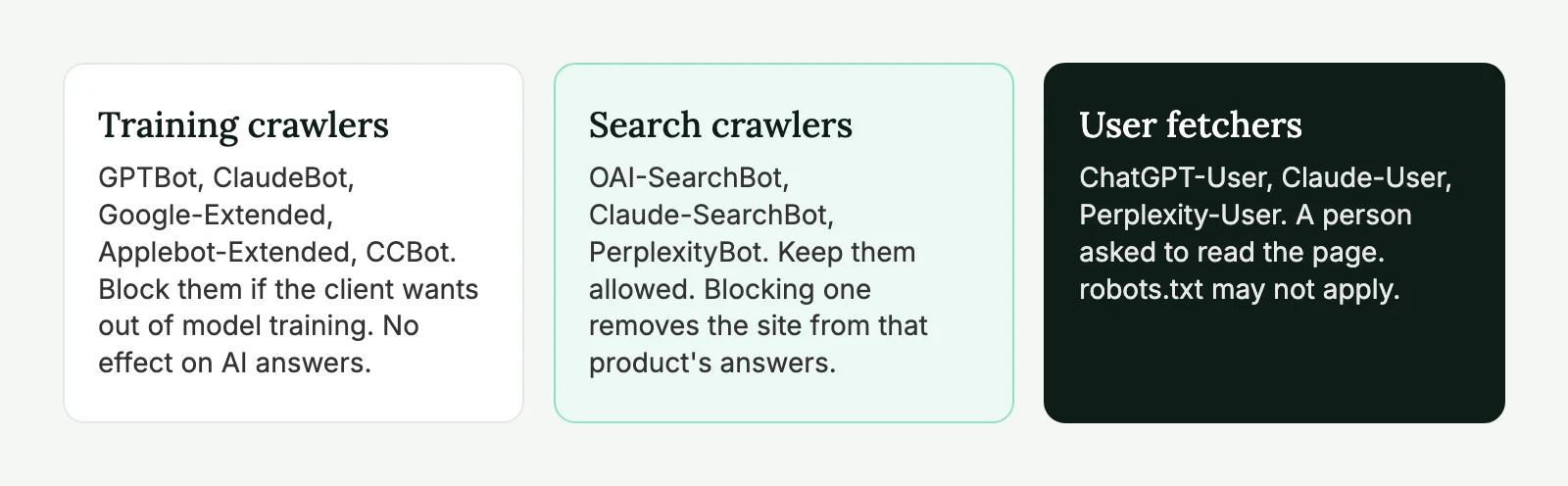
Our default for agency clients: allow every search crawler and user fetcher, and block the training crawlers only if the client asks. Note the Google row. AI Overviews and AI Mode are part of Google Search and use Googlebot, so blocking Google-Extended doesn’t take a site out of them.
What 33 agency sites have in robots.txt
We also fetched robots.txt from 33 white label WordPress agency sites on November 16. Only one blocked any AI crawler, and it blocked training bots only. None blocked a search bot. Nine named AI bots in their file, almost all to allow them explicitly.
So on sites run by people who know WordPress, robots.txt is rarely what keeps AI search out. When a bot can’t get in, the cause is usually one layer up: Cloudflare or the host. The full results are in how to get a WordPress site cited by ChatGPT.
If the client does want to opt out of training, this is the block we use:
User-agent: GPTBot
User-agent: ClaudeBot
User-agent: Google-Extended
User-agent: Applebot-Extended
User-agent: CCBot
User-agent: Meta-ExternalAgent
Disallow: /
Several User-agent lines can share one group under RFC 9309. Don’t give search bots a group of their own unless you need one: a bot with its own group ignores User-agent: * completely, so any Disallow rules you rely on would have to be repeated there.
Where robots.txt comes from on WordPress
WordPress has no robots.txt file. It answers /robots.txt from PHP, until someone puts a real file in the site root; from then on the PHP version is never used. Yoast’s file editor (Yoast SEO → Tools → File editor) writes that physical file, so check with ls -la robots.txt in the WordPress root before editing anything.
Without a physical file, add rules with the robots_txt filter. We keep it in a mu-plugin so a theme change can’t remove it:
<?php
/**
 * Plugin Name: AI crawler rules
 * Description: Opts the site out of AI training crawlers. Search crawlers stay allowed.
 */

add_filter( 'robots_txt', function ( $output, $public ) {
	// Staging, or a site hidden from search engines: leave robots.txt alone.
	if ( ! $public ) {
		return $output;
	}

	$training_bots = array( 'GPTBot', 'ClaudeBot', 'Google-Extended', 'Applebot-Extended', 'CCBot', 'Meta-ExternalAgent' );

	$rules = '';
	foreach ( $training_bots as $bot ) {
		$rules .= "User-agent: {$bot}\n";
	}
	$rules .= "Disallow: /\n\n";

	return $rules . $output;
}, 20, 2 );
We tested it on WordPress 7.1 with Yoast SEO active. The training group comes first and Yoast’s block follows unchanged. Yoast swaps WordPress’s default Disallow: /wp-admin/ for an empty Disallow:, so don’t be surprised when that line is gone.
One thing that has changed and still catches people: Settings → Reading → “Discourage search engines” doesn’t touch robots.txt in current WordPress. It adds a noindex robots meta tag to every page. A staging copy pushed live with it ticked drops out of Google and Bing, and with them out of AI Overviews and Copilot, while robots.txt looks perfectly fine. Look in the page source.
Cloudflare and the host decide first
Two things in our own logs couldn’t be explained by robots.txt.
Bytespider, ByteDance’s crawler, got a 403 on 44 of its 89 requests. Our robots.txt allows it, Cloudflare passed the requests through, and there’s no rule for it in .htaccess. The block comes from the server stack, most likely the host’s own bot protection, and nobody at our end set it up. That’s fine for Bytespider, but it shows how a crawler can be blocked without anyone on the project knowing.
Perplexity is the open question. Not one request from Perplexity’s published IPs reached our server in 31 days, while 81 fakes did. Our robots.txt allows PerplexityBot. In August 2025 Cloudflare publicly accused Perplexity of crawling with undeclared user agents and dropped it from its verified bots list, so Cloudflare’s managed rules are our first suspect. We’re checking the AI Crawl Control log for the domain and will update this section with what we find.
Where to look on a client site behind Cloudflare:
- AI Crawl Control. It lists every AI crawler that tried to reach the domain, with Allow or Block per crawler. Since mid-2025 Cloudflare has offered blocking AI crawlers as a default when a domain is added, so check every site, including the ones you didn’t set up.
- Security settings, bot traffic. The AI crawler access policies and Bot Fight Mode. WAF skip rules can’t bypass Bot Fight Mode, so if it gets in a crawler’s way, the only fix is turning it off.
- Managed robots.txt. Cloudflare can prepend Content Signals (
search,ai-input,ai-train) to your file. If the live robots.txt has lines nobody wrote, they come from here. - WAF custom rules. Old rules that block user agents containing “bot” catch search crawlers too.
Then ask the host. On five of the 38 agency sites we tried to check, a plain request with a normal browser user agent got a 403 or timed out. Bot protection that strict may well stop real crawlers too.
Want us to run the same log and settings check on a client site? Our free AI readiness audit covers robots.txt, Cloudflare, real versus fake bot traffic and what’s in the HTML, as a report you can forward under your brand.
llms.txt: what our logs say
llms.txt is a 2024 proposal: a Markdown file at the site root that lists a site’s most useful pages for language models. Yoast generates one if you switch it on, and 22 of the 33 agency sites we checked have one.
Ours is a physical file Yoast wrote in November. Here’s who requested it in the 31 days of logs:
| Who | Requests |
|---|---|
| Google Lighthouse (it now checks for the file) | 45 |
| SEO tools: SEOJuice, Semrush, BuiltWith, Dataprovider and others | 13 |
| Browsers, curl and our own checks | 20 |
| GPTBot, OAI-SearchBot, ClaudeBot, PerplexityBot, Googlebot | 0 |
Not one AI crawler asked for it. Google says its AI features don’t need special files, and no AI search product has said it reads llms.txt when answering. Our logs agree.
We also noticed what Yoast put in it: Privacy Policy and Contact near the top, a handful of blog posts, and none of our service pages, because they’re a custom post type. If you keep the file, use Yoast’s option to pick pages by hand. We’d spend the time on the HTML and the schema first.
Checklist
- Run the bot check on a month of logs before reporting “AI traffic” to anyone.
- Find out whether the site serves a physical robots.txt or WordPress’s virtual one.
- Training bots blocked only if the client wants it; search bots allowed.
- No
noindexin the page source on live. - Cloudflare AI Crawl Control, Bot Fight Mode and WAF rules checked.
- Host bot protection checked if a real crawler gets 403s.
- llms.txt only if the client wants it, with pages picked by hand.
AI crawlers and robots.txt: FAQ
No. GPTBot is OpenAI’s training crawler. ChatGPT search uses OAI-SearchBot, and OpenAI treats the two settings separately. Block GPTBot to opt out of training and keep OAI-SearchBot allowed.
Check its IP against the ranges the vendor publishes. OpenAI, Perplexity, Google and Bing all publish JSON lists. On our own site about a third of the requests using OpenAI’s bot names came from other IPs, mostly scanners looking for config files.
No. AI Overviews and AI Mode are part of Google Search and use Googlebot. Google-Extended covers Gemini training and grounding in Gemini apps and Vertex AI. Keeping a page out of AI Overviews takes nosnippet, max-snippet or noindex, which also affect the normal result.
Not on our site. In 31 days of logs, our llms.txt was requested 78 times, mostly by Lighthouse and SEO tools, and never by GPTBot, OAI-SearchBot, ClaudeBot, PerplexityBot or Googlebot.
OpenAI and Perplexity say about 24 hours. Anthropic and Google don’t give a fixed time. Test the live file, then check the logs a week later.