ACF Blocks vs Native Gutenberg Blocks: What to Use for Client Sites

The ACF blocks vs Gutenberg blocks question gets argued as if one side is right. On real client sites, it’s a smaller decision than that: how much editing behavior does this block need, who will maintain it, and how much of your budget should go to JavaScript? Both kinds of block sit in the same inserter. Your client won’t know the difference unless you build one of them badly.
We build both as part of our custom Gutenberg block development work, and we’ll tell you up front that we usually start with ACF on content-heavy marketing sites. This article explains why, and when we don’t.
The terms overlap, so a quick note. “Gutenberg blocks” technically includes ACF blocks. Below, “native” means a block written with the block API and React, and “ACF block” means one registered with block.json that uses ACF Pro fields and a PHP template.
How each approach works
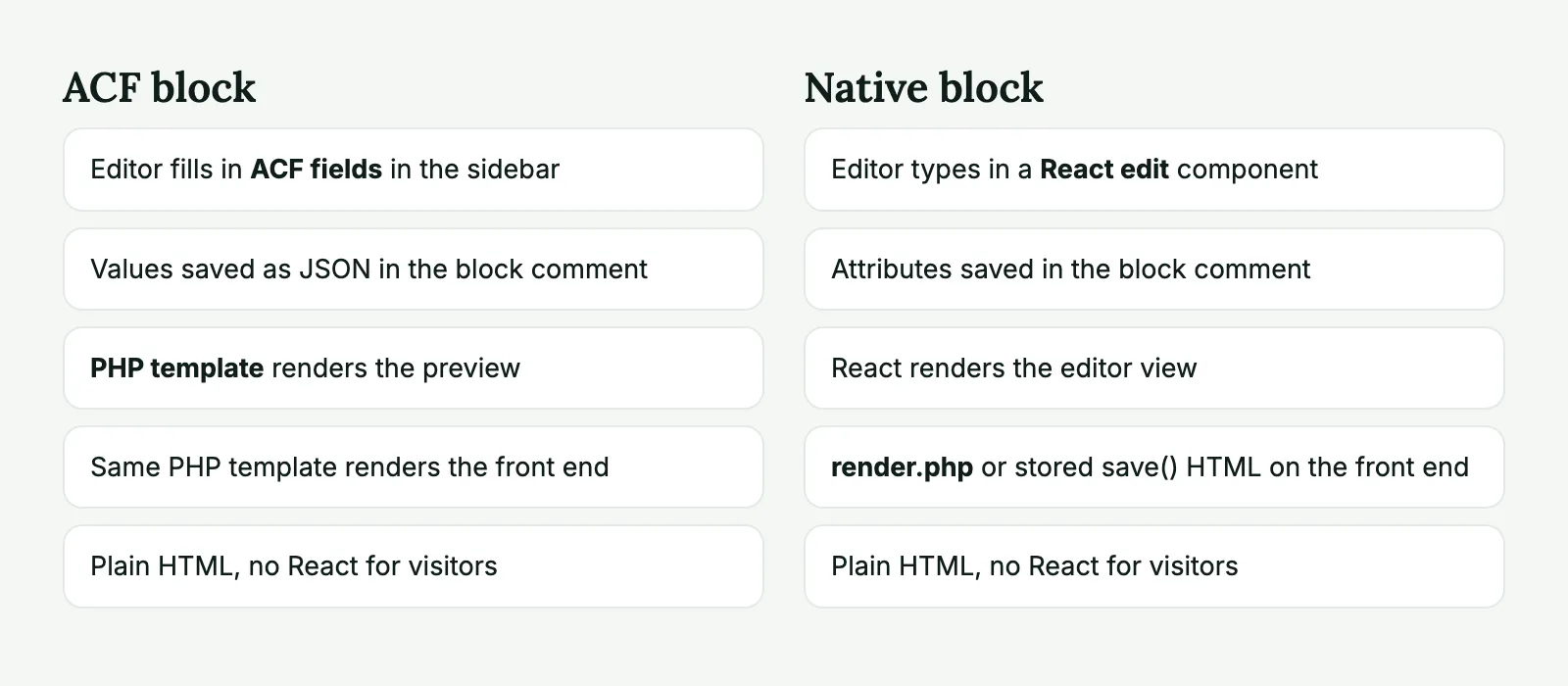
An ACF block has three parts: a block.json that registers it, an ACF field group assigned to it, and a PHP template. Editors fill in fields in the sidebar or in a pop-out panel, and the preview renders from your PHP.
{
  "apiVersion": 3,
  "name": "acf/callout",
  "title": "Callout",
  "category": "design",
  "icon": "megaphone",
  "acf": {
    "blockVersion": 3,
    "mode": "preview",
    "renderTemplate": "render.php"
  }
}
<?php
$heading = get_field( 'callout_heading' );
?>
<section <?php echo get_block_wrapper_attributes( array( 'class' => 'callout' ) ); ?>>
<h2><?php echo esc_html( $heading ); ?></h2>
</section>That’s a working block, once the field group exists. We walk through the whole setup in our ACF blocks tutorial.
A native block needs a build step. block.json declares attributes, a React component handles editing, and the front end comes from either a save function (static HTML stored in the post) or a PHP file (dynamic).
{
  "apiVersion": 3,
  "name": "deviart/callout",
  "title": "Callout",
  "category": "design",
  "icon": "megaphone",
  "attributes": {
    "heading": { "type": "string", "default": "" }
  },
  "editorScript": "file:./index.js",
  "render": "file:./render.php"
}
import { registerBlockType } from '@wordpress/blocks';
import { useBlockProps, RichText } from '@wordpress/block-editor';
import metadata from './block.json';
registerBlockType( metadata.name, {
edit( { attributes, setAttributes } ) {
return (
<section { ...useBlockProps( { className: 'callout' } ) }>
<RichText
tagName="h2"
value={ attributes.heading }
onChange={ ( heading ) => setAttributes( { heading } ) }
placeholder="Add a heading"
/>
</section>
);
},
} );<section <?php echo get_block_wrapper_attributes( array( 'class' => 'callout' ) ); ?>>
<h2><?php echo wp_kses_post( $attributes['heading'] ); ?></h2>
</section>We built both of these against current versions before publishing: the ACF one on ACF Pro 6.8 and WordPress 7.1, the native one with @wordpress/scripts. Same block on the page, and you can already see the difference in effort. The native version has a tooling dependency and a second language. It also lets the editor type directly on the canvas.
Developer speed
ACF blocks are faster to build, and the gap widens with simple blocks. Add a field group, write a template, done. The fields come with validation, conditional logic, repeaters, image pickers, relationship lookups and link pickers. On a native block, each of those is a component you have to wire up. A repeater is the clearest example: one field in ACF, and quite a bit of React state in a native block.
Across both kinds, a block takes us 1 to 5 hours, depending on its size, functionality, design and animations. ACF blocks tend to land toward the bottom of that range for equal scope. A team with strong PHP and little React will feel the difference more than those numbers suggest. Any front-end developer who has worked with WordPress for a few years can maintain an ACF block. React-heavy editor code narrows that pool, and it’s worth asking who will be touching this site in three years.
Native wins back some time on blocks that benefit from what core already provides. If core/columns or core/group with a block style does the job, no custom code beats any custom code.
Editor experience
Here native has the real advantage, though it’s smaller than it used to be. RichText on the canvas feels like editing the page. Toolbar controls, drag-and-drop inside the block and live changes as you type are what people expect after using other editors.
ACF blocks used to mean switching to an “edit mode”, a clunky form that replaced the preview. ACF Blocks V3, available since ACF Pro 6.6, removed that. The preview stays on the canvas, and fields open in the sidebar or a larger pop-out. ACF 6.7 added inline editing, including an autoInlineEditing option for elements whose only content is a field value, so simple text can now be edited directly on the block.
There’s a less obvious point in favor of ACF: fields are guardrails. A marketing coordinator who sees “Heading”, “Text” and “Button link” has few ways to break the layout. Give the same person a free-form canvas, and six months later headings come in three sizes. On sites where clients publish often without a designer watching, we see this as a benefit. A site whose editors want more freedom may feel the opposite.
Native is the better choice if the block’s value is in how it’s edited: a pricing table you rearrange by dragging, or a layout tool the editors use all day.
Performance and front-end output
People often assume native blocks are faster. For visitors, it’s closer to a tie.
An ACF block renders on the server and sends only your HTML, with no React on the front end. A dynamic native block does the same. A static native block has a small edge, since its HTML is saved in the post and doesn’t run a PHP template per view. With page caching on, nobody will measure that difference. Your markup, images and scripts matter far more. A bad block of either kind can load a slider library on every page.
Both kinds support per-block assets in block.json, through style and viewScript. We checked this on WordPress 7.1: with a classic theme, the stylesheet is registered per block, and core’s on-demand loading is on by default. That’s one reason to prefer block-level assets to a large theme stylesheet, though the benefit depends on your theme setup.
There’s a storage difference to know about. ACF saves field values as JSON in the block’s comment within post_content, so a meta_query can’t see them. If you need to filter posts by a value, usePostMeta stores the data in post meta, with a limit of one instance per page. Native block attributes are also in the post content by default.
Maintainability and updates
This is the part that matters most for agencies, since you’ll own the site long after launch.
A static native block has one notorious issue: if you change what save outputs, existing posts fail validation and show a “This block contains unexpected content” warning. The fix is to write a deprecation for each change. Dynamic rendering avoids this, and it’s why we’d use render.php for almost any custom block on a client site. Change the template once, and every page updates.
ACF blocks work like dynamic blocks here. Change the PHP and it’s live everywhere. New fields start empty, so templates need sensible fallbacks, and that’s about the only thing to watch for.
The trade-off is a plugin dependency. ACF blocks need ACF Pro active and licensed, and you’ll want a plan for who holds that license when the client relationship ends. A native block depends only on WordPress, though your build tooling and @wordpress/* packages need occasional updates too. If you’re shipping a block as a product to many sites you don’t control, that independence is decisive. We’d never ask a plugin’s users to buy ACF Pro for a single block.
Field groups should live in version control through ACF Local JSON. Without it, the structure of your blocks lives only in the database, and environments drift apart.
Need a block library your client’s editors won’t break? We do custom Gutenberg block development from your designs, under your brand. Most libraries run 12 to 15 blocks.
ACF blocks vs Gutenberg blocks: decision matrix
| Situation | Use | Why |
|---|---|---|
| Marketing site, block built from a fixed design | ACF | Fast, and fields keep the layout safe |
| Repeaters, relationships, post pickers | ACF | The fields already exist |
| Team stronger in PHP than React | ACF | Easier to maintain later |
| Text-heavy block where editors expect to type on the canvas | Native, or ACF with inline editing | Editing feels closer to the page |
| Interactive editor UI, custom toolbar controls | Native | ACF can’t do this well |
| Layout containers with nested blocks | Native, or ACF with InnerBlocks | Depends on how much editor UI you need |
| Block distributed in a public plugin | Native | No paid dependency |
| Core block plus a block style would work | Neither | Don’t write code you don’t need |
Our default stack and why
For a typical agency marketing site, here’s where we start:
A classic or hybrid theme with theme.json for colors and spacing. Core blocks for paragraphs, lists and images, styled to match the design. ACF blocks for the 12 to 15 designed sections, using V3 and block.json, with field groups in Local JSON. Native blocks only where an ACF block would make editors’ lives worse, and then dynamic rather than static.
We chose this because most of our work comes through agencies, who may have another developer pick up a site later. PHP templates and named fields are easy to read. Nobody needs to install a build chain to change a heading tag.
We’d go the other way on a product with a big in-house React team, on a site built around full-site editing, or for anything sold as a plugin. If your team already writes good React, you’ll lose little by going native and you’ll drop a paid dependency.
Have a design you’re not sure about? Send it to us and we’ll split it into a block list, marking which approach we’d use for each one, with hours.
ACF and native blocks FAQ
Yes. They register with block.json like any other block and sit in the same inserter. The difference is how they’re built: fields and a PHP template instead of a React edit component.
Not in a way visitors notice on a normal site. They render on the server, like any dynamic block, and they don’t need to send React to the front end. Slow pages usually come from images, scripts and queries inside the template, whichever kind of block you use.
The blocks keep working, but you lose access to updates and support, so keep the license active. If the plugin is deactivated altogether, the blocks stop rendering. The data stays in the post content, and it comes back when the plugin is active again.
Yes, and we often do. They appear side by side in the inserter, and editors don’t need to know which is which. Keep markup and spacing consistent so nobody can tell from the front end either.