Moving Multiple Client Sites to a New Host: A Bulk Migration Plan for Agencies
Agencies usually start planning a bulk WordPress migration after one of three things happens: a host raises its renewal price, a reseller account has grown into a mess, or the team is tired of supporting 40 sites on six hosts. The technical work for each site is the same as a single move. What changes is that a small manual step, repeated 40 times, turns into weeks of work and a lot of chances to forget something.
This is the plan we use. If you want the moves done for you under your brand, our WordPress migration service covers bulk schedules as well as single sites. For the per-site mechanics, see how to migrate WordPress to a new host.
Why agencies consolidate hosting
The price is rarely the whole reason, even when it starts the conversation. The operational benefits are bigger. One dashboard, one backup policy and one staging workflow make maintenance cheaper to deliver. Your developers stop losing the first 10 minutes of each task looking for logins, and the PHP upgrade plan stops being a host-by-host investigation.
It isn’t always the right call. A client with a heavy store or strict compliance needs may belong somewhere else, and it’s fine to leave them out. Moving every site to one plan also puts more of your business with one vendor, so check how much an outage or a bad renewal would hurt before you commit. We’d rather see an agency split across two hosts it knows than force everything into one.
Inventory and prioritization
Start with a spreadsheet, and don’t begin any moves until every row is complete. For each site, you need:
- Domain, current host and who pays for that hosting
- Who controls DNS and the registrar, and whether you have the login
- Where email is hosted, and whether it runs on the same server as the site
- WordPress and PHP versions, disk size and database size
- Type of site: brochure, blog, store, membership
- Monthly traffic, and when it’s quietest
- Forms, cron jobs, custom server rules and anything restricted by IP
- Contract notice dates on the old hosting
WP-CLI collects much of this quickly if you have SSH. A loop over your SSH aliases gets you a first pass in minutes:
for site in client-a client-b client-c; do
  echo "== $site"
  ssh "$site" "cd public_html && wp core version && wp eval 'echo PHP_VERSION . PHP_EOL;' && wp db size --human-readable"
done
Then give each site a risk score. Keep it simple: low, medium or critical.
| Risk | Typical site | How we handle it |
|---|---|---|
| Low | Brochure site, little traffic, DNS under your control | Batch freely, plugin or scripted |
| Medium | Busy blog, lead-gen site with paid campaigns, client-owned DNS | Small batches, a window agreed with the client |
| Critical | Store, membership, multisite, custom server setup | One at a time, full plan, maintenance window |
The inventory also reveals sites nobody remembers. A long-running agency account often holds a few abandoned sites. Agree with the account manager on whether to move them, archive them or stop paying for them. That’s often the fastest saving in the whole project.
Batching and scheduling a bulk WordPress migration
Don’t go in the order of the spreadsheet. Start with two or three of the lowest-risk sites and measure the real time per site, including the small fixes. Your estimate will be wrong until you’ve done this, and the first sites are where you find out that the new host needs a setting you didn’t expect.
After that, plan in waves. We group sites by what they have in common: same source host, same plugin stack, same client. Similar sites hit the same problems, and once you’ve solved one, the others go quickly.
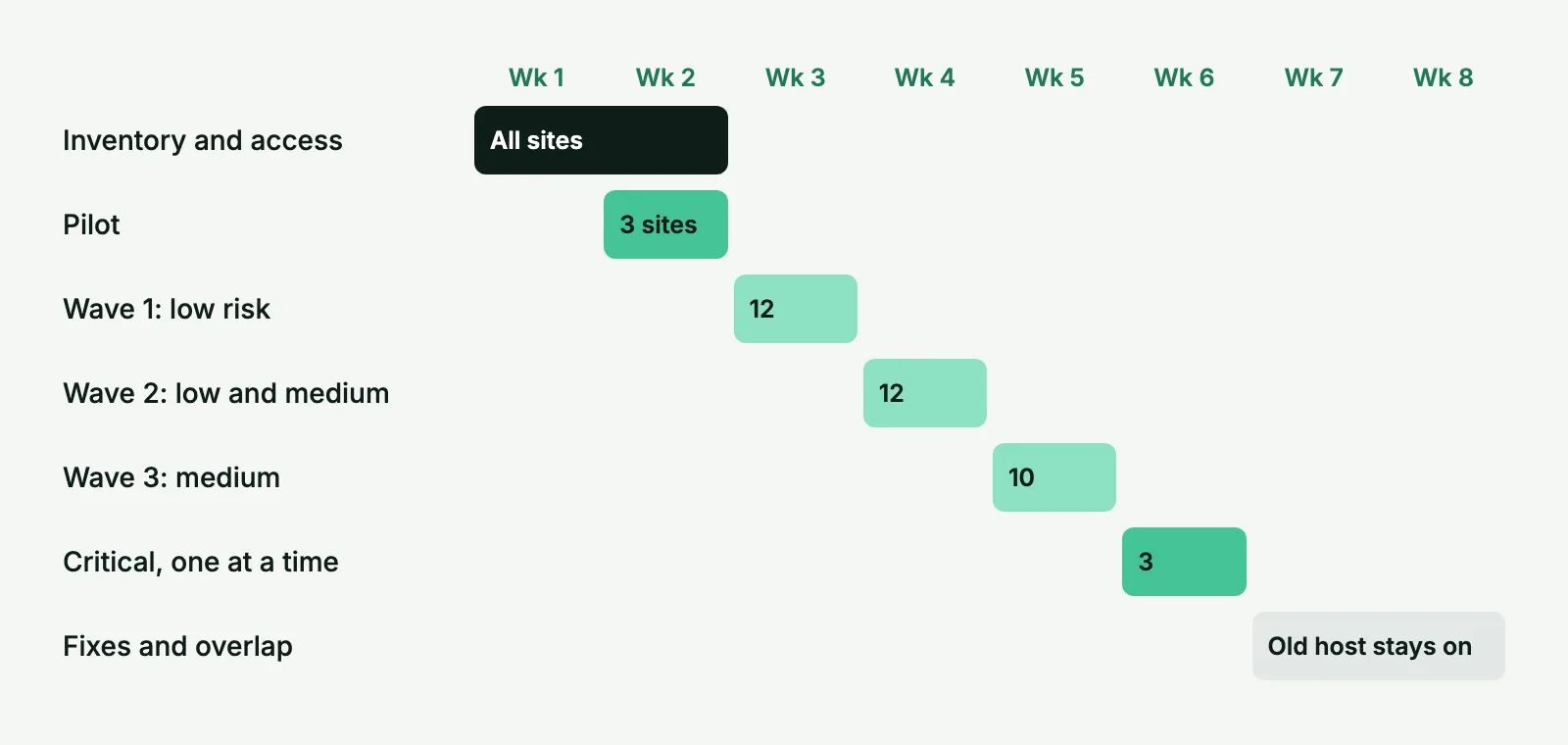
Some rules that keep a schedule from slipping:
- Work back from the date the old hosting ends, and leave at least two weeks of overlap after the last move.
- Lower TTLs across the whole next wave at once, 48 hours ahead. It’s a bulk job that takes minutes if you have DNS access.
- Don’t migrate on a Friday unless someone is on call over the weekend. Check each site’s analytics for its quiet hours, and make sure someone is around for the hour after the switch.
- Keep critical sites out of waves, and avoid your clients’ peak periods. Nobody should move a store in November.
- Plan fix time. A sensible first version is one day in five with no new moves scheduled.
Two or three people moving sites in parallel also need a clear rule about who may touch a DNS zone. Mistakes with shared registrar accounts are hard to spot and harder to explain.
Track progress across sites
A shared sheet works fine. A project tool works too, provided there’s one row per site and one column per checkpoint. Here’s the tracker we start from:
| Site | Risk | Wave | Owner | Tested | Client told | DNS switched | Checks passed | Old host off |
|---|---|---|---|---|---|---|---|---|
| client-a.com | Low | 1 | Anna | Yes | Yes | Mar 4 | Yes | Mar 25 |
| client-b.com | Med | 1 | Anna | Yes | Yes | Mar 5 | Open: form | |
| client-c.shop | Crit | Solo | Ivan | No | Yes |
Add a date, not just a tick, wherever it matters. “Open: form” tells the next person what’s outstanding, without a thread. The rightmost column is the one people forget. Old hosting can run for months after a move, simply because nobody owned the cancellation.
The per-site checks should be the same every time. Use our migration checklist as the template and cut it down for small sites, rather than having each developer use their own memory.
Have 10, 40 or 100 client sites to move? We can run the bulk migration on an agreed schedule, while you keep the client conversations.
Client communication templates
Most clients don’t care which host you use. They care whether something will break and whether they need to do anything. Keep the message short and don’t explain DNS unless they ask.
A notice for clients who don’t need to do anything:
Subject: Scheduled maintenance for [site] on [date]

Hi [name],

We're moving [site] to faster hosting as part of our regular
infrastructure work. It's planned for [date], around [time, time zone].

You don't need to do anything, and we don't expect visitors to notice.
Please avoid publishing or editing content during the hour after [time].

We'll confirm when it's done.

[your name]
For clients who control DNS, ask early, with exact instructions:
Subject: Quick DNS change needed for [site] by [date]

Hi [name],

We're moving [site] to new hosting on [date]. Your domain's DNS is managed
in your [registrar] account, so we need one of the following:

1. Add us as a delegate on the account (preferred), or
2. Forward these details to whoever manages your domain: [records]

Please don't change any email records. They stay as they are.

If this is easier on a quick call, I'm free [times].

[your name]
Then a short confirmation afterward, one or two lines. If the move leaves you with something to show, like a better load time, that’s a good thing to include. Our note on white label client communication covers how to keep the partner out of the conversation.
DNS and email risks
Almost every painful moment in a bulk migration involves DNS or email, not WordPress itself.
Client-owned registrars take days to sort out. Start early, and put any site without access at the end of the schedule until it’s resolved.
Then there’s email on the same server. On a cPanel reseller account, mailboxes may be sitting on the server you’re about to retire. A managed WordPress host won’t run them. Moving those mailboxes to Google Workspace or Microsoft 365 is its own project with its own schedule, and your client needs to know about it before you start. Identify them during the inventory, by checking where the MX records point.
If you switch nameservers instead of editing individual records, copy the whole zone first and compare it. Export the old zone if the host allows it. A forgotten TXT record might be the client’s DKIM or a verification token for a tool you’ve never heard of.
Transactional mail from a new IP can start landing in spam. Route forms and order emails through an SMTP or API service, with SPF and DKIM set up, before you move.
If a payment gateway, ERP or API partner has allowlisted the old server’s IP, an orderly move still ends with a failed integration. Ask about this for every medium and critical site.
Client-managed Cloudflare accounts need a look too. Check the SSL mode on each one before the switch. A “Flexible” setting pointed at a server that forces HTTPS gives you a redirect loop.
After the last site
Don’t close the project on the day the last DNS record changes. Keep the old account alive for the overlap you planned, and watch its access logs. Traffic there tells you about something that’s still pointing at it: a forgotten subdomain, a hard-coded API call, a cron job calling home.
Then update your documentation. Each site should have a current record of its host, its backups and its DNS owner. That spreadsheet you built at the start is now your best record of the portfolio, and it will save you the same work next time.
If you need help, tell us how many sites you have and where they’re going. We’ll suggest a schedule and send a quote.
Bulk migration FAQ
It depends on the sites and the people, not the host. Start with one or two low-risk sites to get a real time per site, then set the batch size from that number. Leave room in each week for fixes, because a batch with no slack makes the next one late.
Yes, unless the contract says hosting is entirely your concern and nothing they control is involved. If a client owns their DNS or email, you need their cooperation anyway, and a short notice beats an awkward call about an unexpected blip.
Ideally you, with access confirmed before the project starts. Missing registrar logins are the most common cause of delay on these projects, so collect them during the inventory.
For scheduling, yes, since the network moves as one unit. For risk, no. A problem affects every subsite at once, so treat a network like one of your critical sites.