How Much Does a Custom WordPress Plugin Cost? Pricing Breakdown for Agencies
How many hours a custom WordPress plugin takes by type, what drives the estimate, what you pay for after launch, and how to write a brief that gets an accurate quote.
Custom WordPress plugin cost is hours multiplied by a rate, and the rate is the easy part. You can compare rates in an afternoon. The hours are where quotes for the same plugin end up three times apart, so this article is about hours: how many a typical plugin takes, what pushes the number up, and what you’ll pay for after launch.
We build plugins for agencies as part of our custom WordPress plugin development service, so the ranges below come from our own time logs. We don’t publish rates. Multiply the hours by whatever quotes you’re getting, and you have a realistic budget.
Custom WordPress plugin cost by type
Most requests we see fall into four groups. The hours cover development, testing on staging and a short handover note. They don’t include writing the spec, which we come back to later.
| Plugin type | Typical examples | Hours |
|---|---|---|
| Small helper | A custom post type with a few fields, a shortcode, an admin notice, a scheduled cleanup task | 4–10 |
| Extension of an existing plugin | Extra WooCommerce checkout fields, a Gravity Forms add-on, custom rules for a membership plugin | 8–25 |
| External API integration | Sending leads to a CRM, pulling stock levels from an ERP, syncing events from a booking system | 15–40 |
| Business logic with admin screens | A quote calculator with its own settings, a partner portal, approval workflows, custom reports | 40–120 |
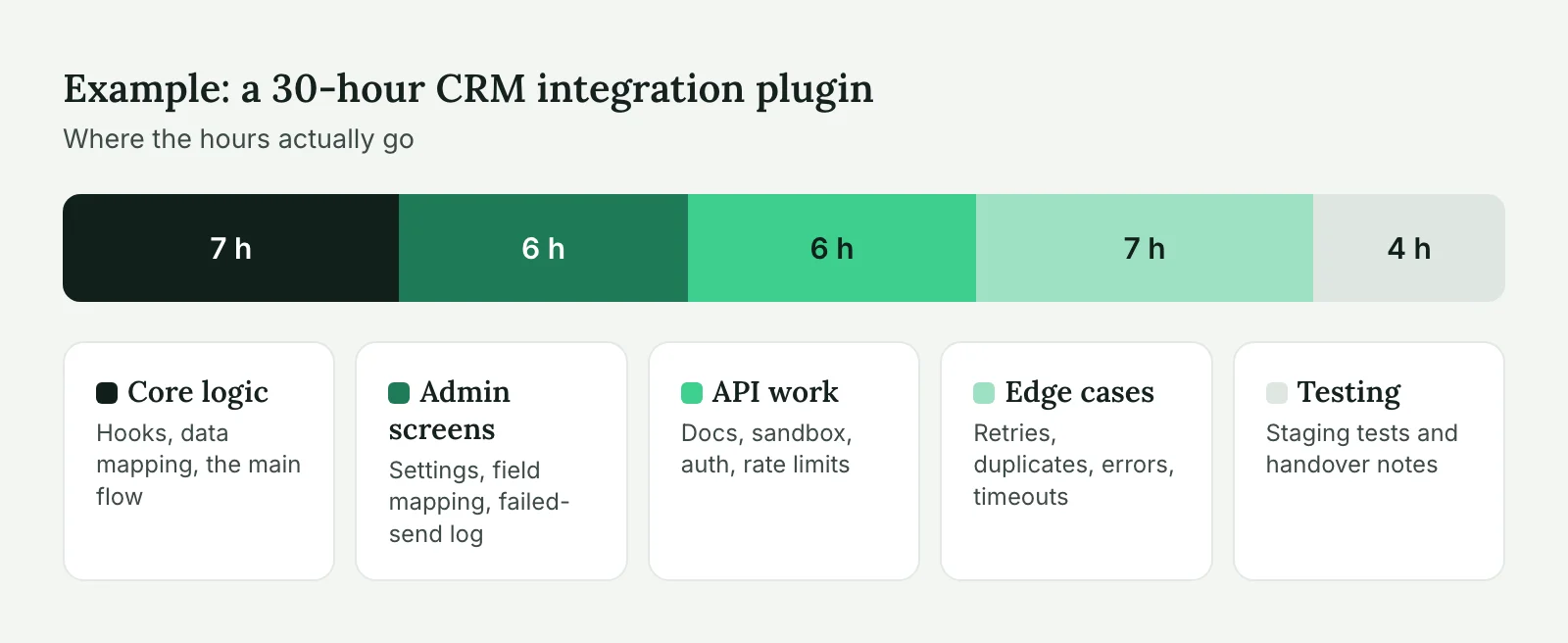
The spread inside each row is wide on purpose. A CRM integration that sends five form fields one way sits near 15 hours. The same integration with two-way sync, field mapping in the admin and retry logic for failed requests sits near 40. Both get described in a brief as “connect the site to HubSpot”.
If you’re not sure a plugin is the right answer in the first place, read when to build a custom WordPress plugin first. Sometimes a well-supported commercial plugin plus a small extension costs a fifth of a custom build.
What drives the hours
Five things move an estimate more than anything else. When two quotes differ a lot, one of these is usually read differently by the two developers.
Admin UI
Logic that runs in the background is cheap. Screens where your client’s staff edit settings, review entries or run reports are not. A settings page built with ACF options can take 1 to 2 hours. A custom list table with filters, bulk actions and CSV export takes 8 to 15. Ask yourself who will touch the plugin after launch and how often. If the answer is “nobody, it just runs”, say so in the brief.
Third-party services
Every external API adds time for reading docs, getting sandbox access, handling rate limits and dealing with errors. Some APIs are pleasant (Stripe, HubSpot). Some have outdated documentation and a sandbox that behaves differently from production, and you only find out in week two. When an integration is involved, we usually ask for API credentials before we commit to an estimate.
Edge cases
The happy path is maybe a third of the work. The rest is what happens when a payment fails halfway, an editor deletes a linked page, two people save the same record, or a cron job runs while the import is still going. A cheap quote usually covers only the happy path. That’s fine for an internal tool, and risky for anything that touches money or customer data.
Data volume
Code that handles 200 products works differently from code that handles 40,000. Large imports need batching (we use Action Scheduler), custom tables instead of post meta, and queries that don’t load everything into memory. If the client’s catalog or user base is big, mention the numbers up front.
Tests and code standards
We write to the WordPress Coding Standards, check nonces and capabilities on every action, and escape all output. That’s part of the base estimate, not an extra. Automated tests (PHPUnit, integration tests against a real API sandbox) add roughly 15 to 25% to the build. They pay off on plugins with money logic or ones that will grow for years. For a small helper, a manual test checklist is enough.
Have a plugin idea and a rough brief? Our custom plugin development team will send an estimate in hours, with the assumptions written out.
Costs after launch
The build is not the whole bill. A custom plugin is code that you or your client now own, and owned code needs care. Budget for these:
- WordPress and PHP updates. Most releases don’t break anything. Every year or two, one does (a deprecated function, a stricter type check in a new PHP version). Plan 1 to 4 hours a year for a small plugin to test it against new versions and fix what comes up.
- Changes in third-party APIs. Services retire endpoints and change authentication. When HubSpot or a shipping provider sends a deprecation email, someone has to update the plugin before the deadline.
- New requests. Once a plugin works, the client will want one more field, one more report, one more status. That’s a good sign, but it’s new scope.
We fix bugs free for 30 days after handover. After that, updates go through a retainer or on-demand hours, whichever fits the client. If the plugin is part of a site we already maintain, it simply joins the weekly update routine on staging.
Fixed price or hourly?
Both work. The choice depends on how clear the scope is.
Fixed price suits small helpers and well-specified plugins. You know the number before you start, which makes it easy to resell to your client. The developer carries the risk of going over, so expect the quote to include some buffer, often 15 to 20%.
Hourly suits integrations with unknown APIs and anything where the client will see the first version and change their mind. You pay only for real time, and you can stop after a working prototype. Ask for a range and a cap (“20 to 30 hours, we’ll check in at 25”) so the open end doesn’t make you nervous.
A middle path that we use a lot: a short paid discovery of 2 to 4 hours, where we read the API docs, look at the existing site and write up the spec. After that, the build itself gets a fixed quote. Discovery hours are small compared to the cost of a wrong estimate.
How to scope a plugin request
A clear brief is the cheapest way to get a lower and more accurate quote. It doesn’t need to be long. Answer these in plain language and you’ll cover most of what a developer needs:
Goal:          What problem does the plugin solve, in one sentence?
Users:         Who uses it: visitors, editors, admins, a cron job?
Trigger:       What starts it: a form submit, an order, a schedule, a button?
Data:          What goes in, what comes out, and where is it stored?
Services:      Any external APIs? Do we have sandbox access and docs?
Volume:        How many records, orders or users, now and in a year?
Admin:         Which settings or screens does the client need?
Failures:      What should happen when something fails? Who gets told?
Environment:   Host (WP Engine, Cloudways, Kinsta...), PHP version, key plugins
Done when:     How will you and the client check that it works?
The “Failures” line is the one most briefs skip, and it’s where the hidden hours are. If you don’t know the answer, write “not sure”. A good developer will propose something instead of guessing silently.
Screenshots help too. A photo of a whiteboard sketch of the admin screen saves an hour of back-and-forth.
Three examples from our projects
All three are anonymized client work done for agencies.
Event reminder emails, 7 hours. A UK design agency’s client ran workshops on a site built with a custom post type. They wanted an email to registered attendees 48 hours before each session. A small plugin hooked into WP-Cron, picked up sessions starting in the next 48 hours, and sent a template email through the site’s existing SMTP setup. There’s one settings field for the email text. Most of the 7 hours went to making sure nobody got the email twice when cron ran late.
CRM lead sync, 28 hours. A US marketing agency needed form leads from a B2B site to reach the client’s CRM with UTM data and the page they came from. The first version took 16 hours. The rest went into a retry queue for when the CRM API was down, a log screen in the admin so the agency could see failed sends, and mapping two forms with different field names. The client later said the log screen was the most useful part. Our article on integrating third-party APIs with WordPress covers the same patterns.
Trade pricing portal, 85 hours. A WooCommerce store wanted wholesale customers to see their own price lists, order by SKU in bulk and get invoices on 30-day terms. It was a mix of WooCommerce hooks, a custom role, a price list editor in the admin and a CSV import for 6,000 products. About a quarter of the time went into the price list editor, because the client’s sales team would use it every day. That one was a fixed quote after 4 hours of discovery.
Ways to bring the cost down
You can cut hours without cutting quality. Start by building on a solid base: an established plugin like WooCommerce, Gravity Forms or ACF Pro already solves storage and admin UI, and an extension costs much less than a standalone build. Skip custom admin screens where an ACF options page or a simple CSV export will do. Ship the first version with the main flow and a log, then add features once people use it. And keep the spec stable during the build. Changes halfway through cost more than the same changes made in version two.
What we wouldn’t cut: input validation, permission checks and error handling. Saving 3 hours there tends to cost 30 later, usually on a Friday.
Plugins that talk to other systems have their own checklist. If yours does, take a look at our WordPress API integration service. Otherwise, send us your brief and we’ll reply with an estimate in hours and the assumptions behind it.
Plugin cost FAQ
It depends on the hours, and the hours depend on the type. A small helper takes about 4 to 10 hours, an extension of an existing plugin 8 to 25, an external API integration 15 to 40, and business logic with its own admin screens 40 to 120. Multiply by your developer’s rate for a budget.
Usually because the brief leaves room for interpretation. One developer prices the happy path, another includes error handling, admin screens and large data volumes. Ask each one to list their assumptions, and compare those, not just the totals.
Often, yes. If an established plugin covers 80% of what you need, extending it usually costs much less than a custom build. Build from scratch when no plugin fits the business logic, or when the existing options add a lot of code you don’t need.
Plan for updates when WordPress, PHP or a connected API changes, typically 1 to 4 hours a year for a small plugin, plus any new features the client asks for. We fix bugs free for 30 days after handover; after that, updates run through a retainer or on-demand hours.