WooCommerce vs Shopify for Agency Clients: How to Recommend the Right Platform
An honest WooCommerce vs Shopify comparison for agencies: where each platform's costs grow, B2B and custom features, content-led stores, performance, lock-in, and a checklist for the discovery call.
WooCommerce vs Shopify is a question your clients will ask you, and they usually ask it after reading a comparison written by one of the two. We build WooCommerce stores, so we’re not neutral either. But we also turn down WooCommerce projects that should be on Shopify, and this article explains how we make that call, so you can make it for your own clients.
Short version: Shopify is the better default for a store that is mostly a store. WooCommerce wins when the shop sits inside a content-heavy site, when the business rules are unusual, or when the client wants to own every part of the stack. Most of the work is figuring out which of those your client is.
WooCommerce vs Shopify: the quick verdict
| Client situation | Our usual recommendation |
|---|---|
| Small catalog, standard checkout, no developer on call | Shopify |
| Store is one part of a content or marketing site | WooCommerce |
| B2B: trade prices, quotes, invoices on terms | WooCommerce (or Shopify Plus, if budget allows) |
| Heavy custom logic: configurators, bookings, subscriptions with rules | WooCommerce |
| High order volume, small team, wants hosting off their plate | Shopify |
| Already on WordPress with years of SEO content | WooCommerce |
| Selling mostly on social channels and marketplaces | Shopify |
The rest of this article is the reasoning behind each row.
How each platform works
Shopify is a hosted platform. The client pays a monthly subscription, Shopify runs the servers, security, checkout and updates, and the store is extended with themes and apps from its app store. You can customize a lot, but within the limits Shopify sets. The checkout in particular is locked down on standard plans.
WooCommerce is a free WordPress plugin. The client pays for hosting, a theme, any paid extensions, and someone to keep it all updated. In return, every part of the store can be changed, from checkout fields to how tax is calculated, and the data sits in a database the client controls.
Neither model is better in general. It’s the old trade between renting a well-run apartment and owning a house: one has a landlord and rules, the other has a maintenance schedule.
Total cost of ownership over three years
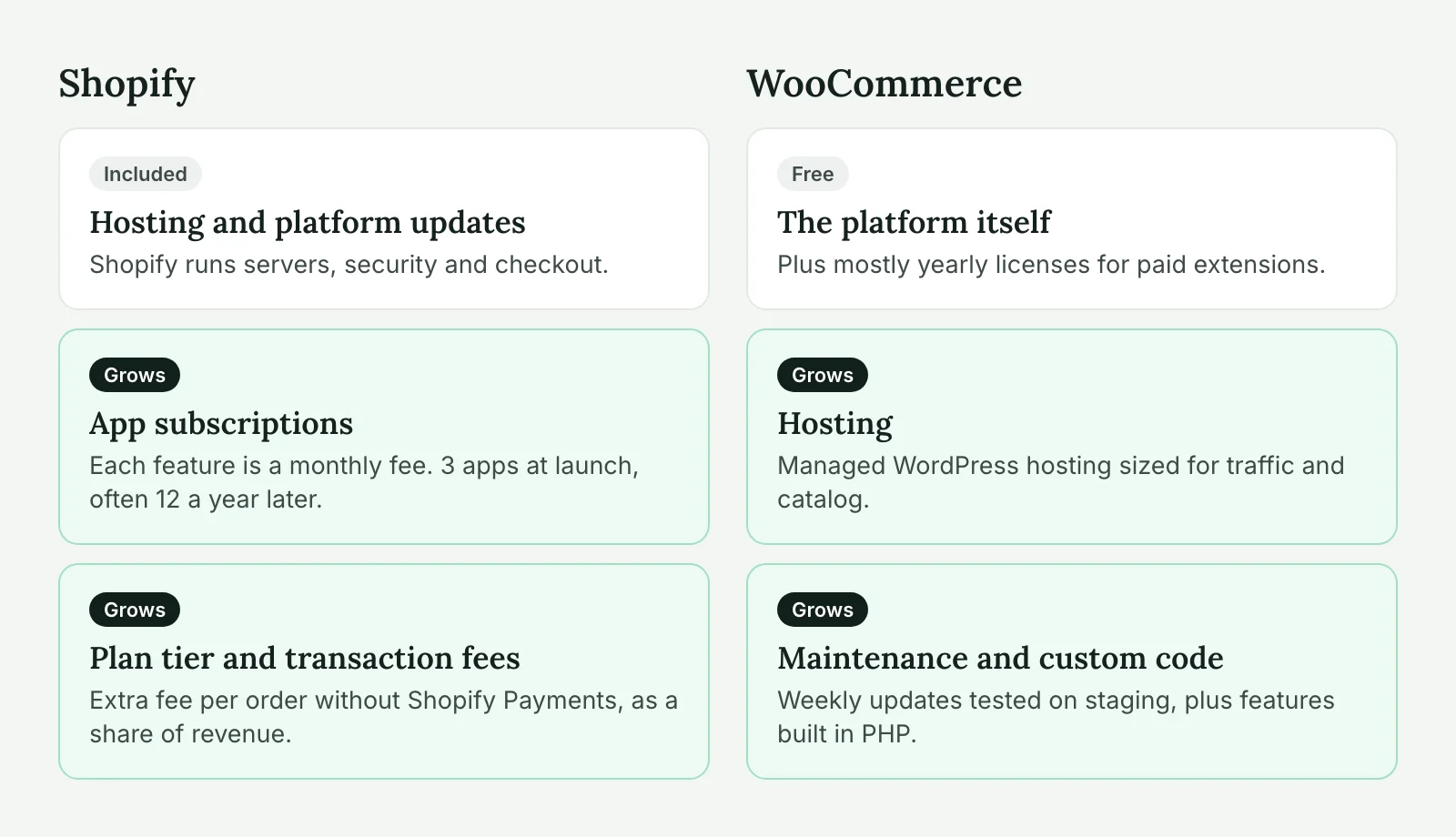
Clients usually compare the Shopify plan price with “WooCommerce is free”, which is the wrong comparison. Both platforms cost money every month. They charge it in different places. Here’s what to add up for each, over three years, for a small-to-medium store:
| Cost line | Shopify | WooCommerce |
|---|---|---|
| Platform | Monthly plan, rising with the tier | Free plugin |
| Hosting | Included | Managed WordPress hosting (WP Engine, Kinsta, Cloudways), sized for traffic |
| Payment fees | Card fees, plus an extra fee per order if the client uses a gateway other than Shopify Payments | Card fees from the gateway (Stripe, PayPal, etc.) only |
| Apps / extensions | Monthly app subscriptions, often 5–15 apps | Mostly yearly licenses for paid extensions |
| Theme | One-off theme purchase, or custom build | One-off theme, or custom build |
| Initial build | Usually fewer hours for a standard store | Usually more hours, especially for custom features |
| Maintenance | Low: Shopify updates the platform | Weekly updates and testing, typically through a care plan |
| Custom features | Custom apps or Plus-only features | Custom code in a plugin |
We’d rather not put platform prices in a table that will be out of date in six months, so plug in current numbers from each provider’s pricing page. A few patterns hold regardless of the exact figures.
App subscriptions are where Shopify budgets drift. A store launches with three apps and has twelve a year later: reviews, subscriptions, bundles, wholesale pricing, product options, translation, search. Each one is a small monthly fee, and together they often cost more than the plan itself. On WooCommerce, the same features are mostly one-off or yearly licenses, or a few hours of custom code.
Maintenance is where WooCommerce budgets drift. A WooCommerce store needs core, plugin and theme updates tested on staging every week, plus someone watching for broken checkouts. On a typical store with 20 to 30 plugins, that’s a few hours a month. Skip it, and the cost shows up later as a hacked site or a checkout that broke during a sale.
Transaction fees decide it at high volume. Shopify’s extra fee for third-party gateways is a percentage of revenue. For a client who can’t or won’t use Shopify Payments (some B2B setups, some industries, some countries), that fee alone can outweigh every other line at a few million in yearly sales.
Customization and B2B features
This is the clearest difference. On WooCommerce, anything that runs in PHP can be changed. Checkout fields, cart rules, shipping logic, tax rules, order statuses, emails, customer roles. If a client says “our trade customers pay on 30-day invoices, but only after their third order, and only in the UK”, that’s a few hours of code on WooCommerce.
On Shopify, the same request turns into a hunt for an app that does most of it, a workaround for the rest, and sometimes an upgrade to Shopify Plus for checkout extensibility. Shopify has improved here a lot (Functions, checkout extensions, B2B features on Plus), but the ceiling is still set by what Shopify exposes.
Typical WooCommerce B2B work we do for agencies:
- Customer-specific price lists and hidden prices for guests
- Quick order forms by SKU and CSV reorder
- Quote requests that turn into orders after approval
- Payment on account, with credit limits
- Sync with the client’s ERP or accounting system for stock and invoices
Most of these exist as WooCommerce extensions, and the rest is custom code. The integrations in particular are where WooCommerce is strong, because you control both ends. See our WordPress API integration service for how we connect stores to ERPs, CRMs and shipping systems.
Building a WooCommerce store for a client? Our white label WooCommerce development team handles builds, B2B features and integrations under your agency’s brand.
Content and commerce: where WordPress wins
If the client’s marketing runs on content, WooCommerce has an advantage that rarely shows up in feature tables. WordPress is a content platform first. Blog posts, guides, landing pages, recipes and product pages all live in one system, with one editor, one search and one set of SEO tools. A guide can list products inline, a product page can pull related articles, and the whole site shares one domain authority.
Shopify’s blog works, but it’s basic. Agencies with content-led clients often end up running WordPress for content on one subdomain and Shopify for the shop on another, then spending time keeping navigation, design and tracking consistent across both. Sometimes that split is the right answer. Often it’s just a sign the client should have stayed on one platform.
The same applies to a client already on WordPress with years of ranking content. Moving the whole site to Shopify to add a shop risks those rankings. Adding WooCommerce to the existing site doesn’t touch them.
When Shopify is the better choice
We recommend Shopify, and send the work elsewhere, more often than you’d think. These are the cases:
The client has no one to maintain the site. If nobody, neither the client, nor you, nor a partner, will update plugins and test checkout every week, WooCommerce will decay. Shopify keeps running without that care.
The store is simple and wants to stay that way. Twenty products, a standard checkout, ships to one country. Shopify gets this live faster and cheaper, and there’s nothing for custom code to do.
Sales happen on many channels. Instagram, TikTok, Google Shopping, Amazon, a POS in a physical shop. Shopify’s channel integrations are more polished, and the inventory sync just works.
Big traffic spikes and a small team. A brand that runs drops or flash sales gets huge spikes. Shopify absorbs them. WooCommerce can too, but it takes proper hosting, caching and load testing, which is real work and real cost.
Telling a client “Shopify fits you better” costs you a build project. It also earns trust, and those clients come back when they need the next thing.
Performance and hosting
A Shopify store’s speed depends mostly on its theme and its apps. The platform side is fast and outside your control. The common problem is app bloat: every app adds its own JavaScript, and a store with fifteen apps can feel slow no matter what.
A WooCommerce store’s speed depends on everything: hosting, caching, theme, plugins, database size. That’s more work, but you also have every lever. Cart and checkout pages can’t be fully cached, so the server has to be good. On larger catalogs, turning on High-Performance Order Storage (HPOS) and cleaning up old sessions and transients makes a visible difference. Our WooCommerce performance playbook goes through the rest. We cover this in our WordPress speed optimization work.
For hosting, we’d put a WooCommerce store on managed WordPress hosting with server-side caching that understands WooCommerce, such as WP Engine, Kinsta or a well-configured Cloudways server. Cheap shared hosting is the most common reason a WooCommerce store feels slow.
Ownership and lock-in
With WooCommerce, the client owns the code, the data and the hosting account. They can move to another host or another developer whenever they want, and export everything from the database. The risk is the opposite one: if the store was built badly, they own that too.
With Shopify, the client can export products, customers and orders, but the theme, the apps and their data stay on Shopify. Leaving means rebuilding the storefront and finding replacements for each app’s features. Shopify can also change its pricing, policies or API rules, and the client has to follow. For most stores this never becomes a problem. For a business whose store is its whole operation, it’s worth saying out loud.
Decision checklist for agencies
Run through these with the client in the discovery call. Each “yes” pushes toward the platform in brackets.
- Is content (blog, guides, landing pages) a main source of traffic? [WooCommerce]
- Is the site already on WordPress, with traffic you’d risk by moving? [WooCommerce]
- Are there B2B rules: trade prices, quotes, payment on account? [WooCommerce]
- Does the store need to sync with an ERP, CRM or custom backend? [WooCommerce]
- Will someone own weekly updates and checkout testing? [WooCommerce if yes, Shopify if no]
- Does the client sell on many channels, or in a physical shop? [Shopify]
- Is the catalog small and the checkout standard? [Shopify]
- Does the client want to avoid dealing with hosting at all? [Shopify]
- Can the client use Shopify Payments? [Shopify if yes; if no, check what the extra fee costs at their volume]
If the answers are mixed, look at question 5 first. A WooCommerce store without maintenance is the worst of both worlds.
When the answers point to WooCommerce, we can build the store, the integrations and the B2B features under your brand through our white label WooCommerce development service. Send us the client’s requirements and we’ll reply with an estimate in hours, or with an honest “this one is a Shopify job”.
WooCommerce vs Shopify FAQ
Not automatically. WooCommerce has no platform fee, but the client pays for hosting, extensions and regular maintenance. Shopify includes hosting but adds app subscriptions and, without Shopify Payments, an extra transaction fee. Compare the full three-year cost for the specific store.
WooCommerce is usually easier for B2B rules like customer-specific prices, quotes and payment on account, because everything can be changed in code. Shopify has B2B features on its Plus plan, which suits larger budgets.
Both can rank well. WooCommerce has the edge for content-led stores, because blog posts, guides and products live in one WordPress site with one set of SEO tools. Shopify’s blog and URL structure are more limited.
When the store is simple, sells on many channels, has big traffic spikes, or has no one to handle weekly updates and checkout testing. In those cases Shopify is cheaper to run and less likely to break.
Yes. Products, customers and orders can be exported and imported, and URLs can be redirected to keep rankings. The theme and app features have to be rebuilt, so plan it as a project, not a one-day switch.