Syncing WordPress With External Data: Cron, Webhooks and Queues Done Right
WordPress webhooks, cron jobs and queues are how a site keeps up with data that lives somewhere else: stock levels in an ERP, events in a booking system, listings in a property database, prices from a supplier feed. The first version of a sync is usually a cron job that fetches everything and saves it. It works on staging with 200 records. In production, with 30,000 records and an API that times out now and then, it quietly stops halfway and nobody notices for a week.
This article covers the architecture we use for syncs that run for years without babysitting: when to pull and when to push, why WP-Cron alone isn’t enough, how Action Scheduler handles heavy jobs, how to make every step safe to repeat and how to recover from a half-finished run. It’s the core of most projects our WordPress API integration team builds for agencies. All code below was run against a mock API on a test WordPress install with Action Scheduler, including the failure cases.
Four syncs agencies ask for
The same pattern covers most requests we get. What changes is the data and who owns it.
| Scenario | Direction | What moves | Typical trigger |
|---|---|---|---|
| WooCommerce and an ERP | Both ways | Products, prices and stock in; orders out | ERP webhooks plus a pull every 1–3 hours |
| WordPress and a CRM | Out | Leads, contacts, order history | Form submit or order, queued |
| Listings from an external API | In | Properties, vehicles, courses, events | Pull every 15–60 minutes |
| Supplier feed into WooCommerce | In | New products, prices, availability | Nightly file or API pull |
Example: a B2B distributor keeps 30,000 products in its ERP. Prices change for a few hundred products a day, and stock for about 1,500. The ERP can send webhooks for stock changes but not for prices. The setup we’d build: webhooks for stock, an incremental pull of everything changed every three hours, batches of 100 records in Action Scheduler, and the ERP as the owner of prices and stock while the client’s marketing team owns descriptions and images in WordPress. The first full import is about 300 batches. After that, a normal three-hour run touches 5 to 20 batches.
Pull vs push: cron or webhooks
There are two ways data gets from another system into WordPress.
Pull: WordPress asks the other system for changes on a schedule. “Give me all products updated since 14:00.” You control the timing and the load, and it works with any API that can list records. The downside is delay (changes arrive at the next run) and wasted calls when nothing changed.
Push: the other system calls WordPress when something changes, through a webhook. Changes arrive within seconds and there are no empty calls. But you depend on the other system to send every event, and webhooks do get lost: during a deploy, when the server returns a 500, when the sender gives up after three retries.
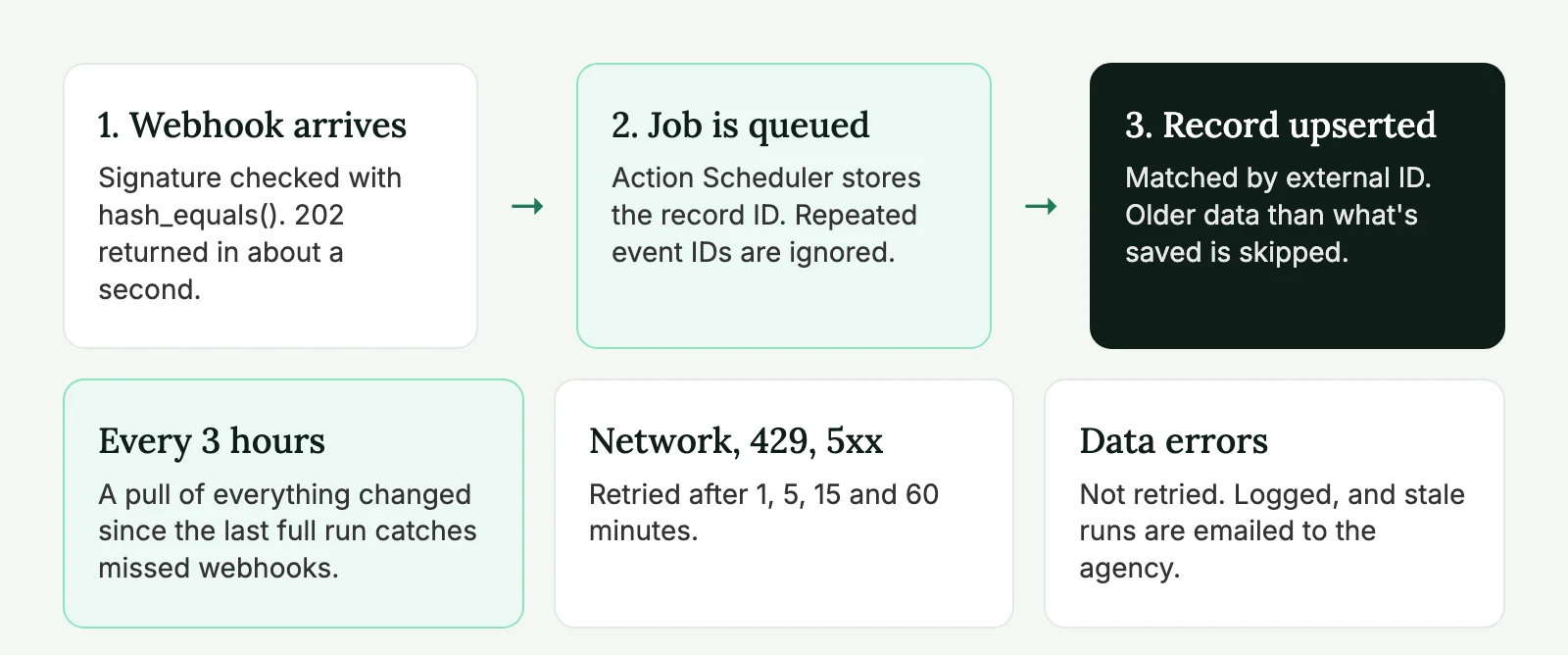
For anything that matters, we use both. Webhooks bring changes in quickly, and a scheduled pull every few hours catches whatever the webhooks missed. If the source system has no webhooks, pull alone is fine. Just make it incremental.
WP-Cron limits and real cron
WP-Cron isn’t a real scheduler. It checks for due events when someone visits the site and runs them in that request’s wake. That causes three problems for syncs:
- On a quiet site, jobs run late or not at all, because nobody visits at 3 a.m.
- On a site with full page caching, most visits never reach PHP, so WP-Cron rarely fires.
- A long job runs inside a web request and hits PHP’s time limit, usually 30 to 60 seconds.
The fix is to turn off the visitor trigger and call cron from the server, as the WordPress cron documentation describes:
// wp-config.php
define( 'DISABLE_WP_CRON', true );
# Server crontab: run due events every 5 minutes.
*/5 * * * * cd /path/to/site && wp cron event run --due-now > /dev/null 2>&1Managed hosts have their own way of doing this. Cloudways has a Cron Job Management screen in the application settings. WP Engine can run WP-Cron on a server schedule if you ask support. Either way, check after launch that events actually run: wp cron event list shows what’s due and when.
Real cron fixes the timing. It doesn’t fix job size. For that you need a queue.
Action Scheduler: the full batch cycle
Action Scheduler is a job queue for WordPress. It ships with WooCommerce and can be added to any plugin as a Composer package (woocommerce/action-scheduler). Jobs are stored in their own database tables, run in batches, and show up in an admin screen (Tools → Scheduled Actions, or WooCommerce → Status → Scheduled Actions) with logs.
Our pattern has three parts: a small recurring job that opens a “run” and queues one batch per page, batch jobs that do the work, and a check that closes the run when nothing is left. Each run gets its own Action Scheduler group, so it’s easy to see which batches belong together.
add_action( 'init', function () {
	if ( function_exists( 'as_has_scheduled_action' ) && ! as_has_scheduled_action( 'acme_sync_start', [], 'acme-sync' ) ) {
		as_schedule_recurring_action( time(), 3 * HOUR_IN_SECONDS, 'acme_sync_start', [], 'acme-sync' );
	}
} );

// One run = everything changed since the last fully successful run.
add_action( 'acme_sync_start', function () {
	$run = get_option( 'acme_sync_run' );

	if ( $run ) {
		// A previous run is still open. Close it if its jobs are gone (crash, lost race), otherwise wait.
		if ( ! acme_sync_finish_if_done( $run['id'] ) ) {
			return;
		}
	}

	$since = get_option( 'acme_sync_since', '1970-01-01T00:00:00Z' );
	$run   = [
		'id'      => (string) time(),
		'since'   => $since,
		'started' => gmdate( 'c' ), // Becomes the next "since" if the run succeeds.
		'failed'  => false,
	];
	$total = acme_api()->count_products( [ 'updated_since' => $since ] );
	$pages = (int) ceil( $total / 100 );

	if ( 0 === $pages ) {
		update_option( 'acme_sync_since', $run['started'], false );
		update_option( 'acme_sync_last_success', gmdate( 'c' ), false );
		return;
	}

	update_option( 'acme_sync_run', $run, false );

	for ( $page = 1; $page <= $pages; $page++ ) {
		as_enqueue_async_action( 'acme_sync_batch', [ $run['id'], $page, 1 ], 'acme-sync-' . $run['id'] );
	}
} );
Here acme_api() stands for your API client: a small class around wp_remote_get() that returns the decoded body and the HTTP status code. A batch of 100 records takes a few seconds, well inside any time limit.
The batch job retries temporary errors with growing delays and gives up on data errors right away. A network error, a timeout, a 429 (rate limit) or a 5xx will probably work in a few minutes. A 400 or 422 means the request or the data is wrong and will fail again, so a person needs to look.
add_action( 'acme_sync_batch', function ( $run_id, $page, $attempt ) {
	$run = get_option( 'acme_sync_run' );
	if ( ! $run || $run['id'] !== $run_id ) {
		return; // The run was closed; nothing to do.
	}

	$response = acme_api()->list_products( [ 'updated_since' => $run['since'], 'page' => $page, 'per_page' => 100 ] );

	if ( is_wp_error( $response ) || in_array( $response['code'], [ 429, 500, 502, 503, 504 ], true ) ) {
		if ( $attempt < 5 ) {
			$delay = [ 60, 300, 900, 3600 ][ $attempt - 1 ];
			as_schedule_single_action( time() + $delay, 'acme_sync_batch', [ $run_id, $page, $attempt + 1 ], 'acme-sync-' . $run_id );
			return;
		}
		acme_sync_mark_failed( $run_id );
		throw new RuntimeException( "Page $page failed after 5 attempts." ); // Shows up as failed in the admin.
	}

	if ( 200 !== $response['code'] ) {
		acme_sync_mark_failed( $run_id ); // 4xx: retrying won't help. A person needs to look.
		throw new RuntimeException( "Page $page: API returned {$response['code']}." );
	}

	foreach ( $response['items'] as $item ) {
		acme_upsert_product( $item );
	}

	acme_sync_finish_if_done( $run_id );
}, 10, 3 );
Closing a run and recovering from a partial failure
The “updated since” marker is the most important value in the whole sync. Move it too early and the records in a failed batch are skipped forever. So the marker only moves when every batch of a run has succeeded:
function acme_sync_mark_failed( string $run_id ): void {
	$run = get_option( 'acme_sync_run' );
	if ( $run && $run['id'] === $run_id ) {
		$run['failed'] = true;
		update_option( 'acme_sync_run', $run, false );
	}
}

/**
 * Close the run once no batch is waiting or running. Returns true if the run is closed.
 * The "since" marker only moves when every batch succeeded, so a failed run is
 * simply repeated from the same point next time. Upserts make that safe.
 */
function acme_sync_finish_if_done( string $run_id ): bool {
	$group   = 'acme-sync-' . $run_id;
	$pending = as_get_scheduled_actions( [ 'group' => $group, 'status' => ActionScheduler_Store::STATUS_PENDING, 'per_page' => 1 ], 'ids' );
	$running = as_get_scheduled_actions( [ 'group' => $group, 'status' => ActionScheduler_Store::STATUS_RUNNING, 'per_page' => 2 ], 'ids' );

	// The batch calling this is itself "in-progress", so one running action is fine.
	$self_running = doing_action( 'acme_sync_batch' ) ? 1 : 0;
	if ( $pending || count( $running ) > $self_running ) {
		return false;
	}

	$run = get_option( 'acme_sync_run' );
	if ( ! $run || $run['id'] !== $run_id ) {
		return true;
	}

	if ( empty( $run['failed'] ) ) {
		update_option( 'acme_sync_since', $run['started'], false );
		update_option( 'acme_sync_last_success', gmdate( 'c' ), false );
	}
	delete_option( 'acme_sync_run' );

	return true;
}
Recovery needs no extra code. If page 7 of 40 fails for good, the run is marked as failed and closed by the next scheduled start, and the marker stays where it was. The next run asks the API for everything changed since the same point and processes all 40 pages again. The 39 pages that already went through cost a few seconds, because the upsert skips records that haven’t changed. Page 7 gets another chance.
We tested exactly this: a clean run of 250 records, a rerun with no changes, five changed records with two temporary 503 errors on the first page, and a page that kept failing. The clean runs moved the marker, the temporary errors were retried and the run finished, and the permanent failure left the marker untouched until the API came back. No duplicates in any case.
Idempotency: make every step safe to repeat
A job will run twice sooner or later. A webhook arrives twice. A batch times out after saving half its records and gets retried. Your code has to give the same result no matter how many times it runs. That property is called idempotency, and it’s the difference between a sync and a duplicate-product generator.
Three rules cover most cases:
- Match on the external ID, never on the title. Store the other system’s ID in post meta and look it up before creating anything.
- Compare timestamps. If the local record is already as new as the incoming one, skip it. That protects you from an old webhook arriving after a newer pull.
- Remember processed webhook events. Most senders include an event ID. Store it for a day and ignore repeats.
function acme_upsert_product( array $item ): int {
	$existing = get_posts( [
		'post_type'   => 'product',
		'post_status' => 'any',
		'meta_key'    => '_acme_external_id',
		'meta_value'  => $item['id'],
		'fields'      => 'ids',
		'numberposts' => 1,
	] );
	$post_id = $existing[0] ?? 0;

	// Skip if what we have is already as new as the incoming data.
	if ( $post_id && strtotime( get_post_meta( $post_id, '_acme_updated_at', true ) ) >= strtotime( $item['updated_at'] ) ) {
		return $post_id;
	}

	$post_id = wp_insert_post( [
		'ID'          => $post_id,
		'post_type'   => 'product',
		'post_status' => 'publish',
		'post_title'  => sanitize_text_field( $item['name'] ),
	], true );

	if ( is_wp_error( $post_id ) ) {
		throw new RuntimeException( $post_id->get_error_message() );
	}

	update_post_meta( $post_id, '_acme_external_id', $item['id'] );
	update_post_meta( $post_id, '_acme_updated_at', $item['updated_at'] );

	return $post_id;
}
For WooCommerce products, use the product object (wc_get_product(), set_regular_price(), save()) instead of writing meta directly, so lookup tables and caches stay in sync. With large catalogs, add an index on the external ID meta or keep a small mapping table. A meta lookup by value on a big wp_postmeta table gets slow.
Data conflicts: who owns which field
Most sync bugs we’re called in to fix aren’t code bugs. They’re ownership bugs. The ERP overwrites a description the marketing team spent a week on, or a price someone corrected by hand comes back the next morning.
Decide ownership per field, not per record, and write it down before you build:
- The source system owns what it’s the authority on: SKU, price, stock, tax class, weight. The sync writes these every time they change.
- WordPress owns what people edit there: descriptions, images, SEO fields, categories used for navigation. The sync creates them once for new products and never touches them again.
- A few fields need a rule. If the client wants to override a price for a promotion, store the override in its own field and let the theme or WooCommerce use it, instead of letting someone edit the synced price.
Deletions need their own decision. When a product disappears from the source, don’t delete it in WordPress. The URL may have links and rankings, and the order history points at it. We set it to out of stock and hidden from the catalog, log it, and let the client decide after 30 days whether to redirect or remove it. To detect deletions, either use the API’s “deleted since” endpoint if it has one, or compare the full list of IDs once a night.
Two systems editing the same field at the same time is rare, but it happens. With field ownership in place, it can only happen on the few shared fields, and “newest timestamp wins” is usually good enough there.
Securing WordPress webhooks
A webhook endpoint is a public URL that changes data on the site, so treat it like a login form. Register it with the REST API and check the signature in permission_callback, before any of your code runs:
add_action( 'rest_api_init', function () {
	register_rest_route( 'acme/v1', '/webhook', [
		'methods'             => 'POST',
		'callback'            => 'acme_handle_webhook',
		'permission_callback' => function ( WP_REST_Request $request ) {
			$signature = (string) $request->get_header( 'x-acme-signature' );
			$expected  = hash_hmac( 'sha256', $request->get_body(), ACME_WEBHOOK_SECRET );
			return hash_equals( $expected, $signature );
		},
	] );
} );

function acme_handle_webhook( WP_REST_Request $request ) {
	$event = $request->get_json_params();

	if ( empty( $event['id'] ) || empty( $event['data']['id'] ) ) {
		return new WP_REST_Response( [ 'error' => 'Missing event or record ID.' ], 400 );
	}

	if ( get_transient( 'acme_event_' . md5( $event['id'] ) ) ) {
		return new WP_REST_Response( null, 200 ); // Already handled.
	}
	set_transient( 'acme_event_' . md5( $event['id'] ), 1, DAY_IN_SECONDS );

	as_enqueue_async_action( 'acme_process_event', [ (string) $event['data']['id'] ], 'acme-sync' );

	return new WP_REST_Response( null, 202 );
}

// The job fetches the current record, so an old or repeated event can't overwrite newer data.
add_action( 'acme_process_event', function ( $external_id ) {
	$item = acme_api()->get_product( $external_id );

	if ( is_wp_error( $item ) ) {
		throw new RuntimeException( $item->get_error_message() ); // Failed, visible in the admin.
	}

	acme_upsert_product( $item );
} );
In our test, a request with a wrong signature got a 401 before any of this code ran, a valid event got a 202 and one queued job, and the same event sent again got a 200 and no second job.
The job gets only the record’s ID and fetches the current version from the API. That keeps job arguments small (Action Scheduler limits their size) and means you always save the latest state, even if events arrive out of order. Use hash_equals(), not ===, so the comparison doesn’t leak timing information. And respond fast: senders often time out after 5 to 10 seconds and then send the same event again.
Check the sender’s documentation for the exact signature format. Some sign the raw body, some add a timestamp to block replayed requests, and some use a shared token in a header instead. Keep the secret in wp-config.php, not in the database or the code. Also exclude the endpoint from page caching and from security plugins that block POST requests without a nonce. Our article on integrating third-party APIs with WordPress covers keys and sandboxes in more detail.
Need a sync that keeps working when the API doesn’t? Our API integration team builds them for agencies, with logging your client’s team can read.
How this scales
Rough guidance by volume. Real limits depend on the hosting, the API and how heavy each record is (variations and images are the slow part).
| Records | What’s enough |
|---|---|
| Up to ~500 | One scheduled job with real cron. A queue is nice but optional. |
| ~10,000 | Action Scheduler with batches of 50–100, incremental pulls, an index on the external ID. |
| ~100,000 | All of the above, plus a mapping table instead of meta lookups, the first import run from WP-CLI, and images downloaded in their own queue. |
| Much more, or heavy processing | A separate worker or queue service outside WordPress that prepares the data, with WordPress only saving the result. |
Most agency projects sit in the middle two rows. We’ve rarely needed a queue outside WordPress for a catalog sync. When we did, it was because each record needed heavy processing before saving, not because of the record count.
Troubleshooting
| Symptom | Likely cause | Where to look |
|---|---|---|
| Sync doesn’t start at all | WP-Cron disabled with no server cron, or cron hits a cached URL | wp cron event list, the host’s cron settings |
| Some products are never updated | A batch failed for good and the marker moved anyway, or pagination shifted during the run | Failed actions in the run’s group, the API’s sort order |
| Duplicate products | Lookup by title or SKU text instead of the external ID, or two runs at once | The upsert function, open runs |
| Old prices come back | An old webhook processed after a newer pull, or the sync overwrites a field WordPress should own | Timestamps on records, field ownership rules |
| API returns 429 | Too many batches at once for the API’s rate limit | Lower batch concurrency, add delay between batches |
| Batches time out | Batch too large, or image downloads inside the batch | Batch size, move images to their own queue |
One note on pagination: if the API sorts by “last updated”, records that change during a run move between pages and some get skipped. Ask the API to sort by ID, or by update time with the run’s start time as an upper bound.
Monitoring
A sync that fails loudly is fine. One that fails quietly is the real risk. Three checks catch almost everything:
- Last successful run.
acme_sync_finish_if_done()saves the time inacme_sync_last_success. A daily job sends an email (or a Slack message) when it’s older than twice the schedule. - Failed actions. Count failed jobs for the sync hooks with
as_get_scheduled_actions()and alert above a small threshold. - Spot checks. Once a week, compare a few records on both sides: count of products, a random price, a random stock level.
add_action( 'acme_daily_health_check', function () {
	$last_ok = strtotime( get_option( 'acme_sync_last_success', '' ) );
	if ( ! $last_ok || $last_ok < time() - 6 * HOUR_IN_SECONDS ) {
		wp_mail( get_option( 'admin_email' ), 'Product sync has not finished in 6 hours', 'Check Tools → Scheduled Actions, hook acme_sync_batch.' );
	}
} );
Send alerts to the agency, not to the client’s general inbox, where they get filtered as noise.
Testing a sync before launch
Run it against the API’s sandbox, or a copy of real data, and try to break it on purpose: run the same batch twice, send the same webhook twice, send an older version of a record after a newer one, block the API host halfway through a run and check that the marker doesn’t move, and run the full import with production-sized data while watching memory and time per batch.
Sync code belongs in a site plugin, not the theme. It has to keep running through redesigns, and it needs activation hooks to schedule and clear its jobs. We explain the split in plugin or functions.php.
External data sync checklist
- Write down which system owns each field, and what happens when a record is deleted at the source.
- Use webhooks plus a scheduled pull when data matters.
- Turn off visitor-triggered WP-Cron and run it from the server.
- Split work into small batches in Action Scheduler, one group per run.
- Upsert by external ID and skip older data.
- Store webhook event IDs and ignore repeats; fetch the current record in the job.
- Retry network, 429 and 5xx errors with growing delays; fail data errors at once.
- Move the “updated since” marker only after a run where every batch succeeded.
- Verify webhook signatures in
permission_callbackwithhash_equals(), and return 202 fast. - Alert when the last successful run is too old or failed jobs pile up.
External data sync FAQ
Use webhooks for speed and a scheduled pull as a safety net when the data matters. Webhooks bring changes in within seconds, but some get lost; a pull every few hours catches what they missed. If the other system has no webhooks, an incremental pull alone works well.
Not on its own. WP-Cron only runs when someone visits the site, rarely fires on cached sites and runs inside a web request with a time limit. Disable the visitor trigger and run cron from the server every few minutes, then use a queue like Action Scheduler for the heavy work.
With the pattern in this article, nothing is lost. The run is marked as failed, the “updated since” marker stays where it was, and the next run processes everything since that point again. Records that already went through are skipped because they haven’t changed.
Decide which system owns each field. Let the source system write only the fields it owns, such as price and stock, and set descriptions, images and SEO fields only when a product is first created.
Register it through the REST API and verify the sender’s signature in the permission callback, using a secret kept in wp-config.php and hash_equals() for the comparison. Ignore repeated event IDs, queue the work and return a 202 response quickly.