WordPress HubSpot Integration: Forms, CRM Sync and Tracking Done Right
When the official HubSpot plugin is enough, how to embed HubSpot forms without slowing the page, how to send WordPress forms and WooCommerce data to HubSpot through the API, and how to debug missing leads.

A WordPress HubSpot integration usually has three jobs: get leads from site forms into the CRM, track which pages those leads visited, and do both without slowing the site down. Most setups we inherit do one of the three well. The forms work but the site loads 400 KB of HubSpot scripts on every page, or the tracking is perfect but half the leads never arrive because a form field was renamed.
This guide covers what we do on agency client sites as part of our WordPress API integration work: when the official plugin is enough, how to embed HubSpot forms without hurting Core Web Vitals, how to send any WordPress form to HubSpot through the API, and how to debug the failures that come up most.
The official plugin or a custom WordPress HubSpot integration?
HubSpot’s own plugin (listed as “HubSpot All-In-One Marketing” in the WordPress directory) adds the tracking code, lets editors drop HubSpot forms into pages, and can capture submissions from some non-HubSpot forms through its “collected forms” feature. For a small marketing site where the client lives in HubSpot and edits forms there, it’s a reasonable choice. Setup takes 20 minutes.
It stops being enough when any of these is true:
- The site already uses Gravity Forms or Contact Form 7, with conditional logic, file uploads or payments that HubSpot forms can’t do.
- You need data that isn’t a form: WooCommerce orders, event registrations, membership sign-ups, logged-in user changes.
- Collected forms keep missing submissions. It works by watching the page for form submits, so AJAX forms, multi-step forms and forms inside popups are hit and miss.
- Performance matters, and the plugin’s admin features and scripts are more than the site needs.
Our usual setup for agency sites is a middle path. The HubSpot tracking code goes in through the theme or a tag manager, forms stay in Gravity Forms or CF7, and a small custom plugin sends each submission to HubSpot through the Forms API. The client keeps their familiar forms, HubSpot gets clean data with page and cookie context, and nothing breaks when an editor changes the form’s layout.
| Official plugin | Custom integration | |
|---|---|---|
| Setup time | Under an hour | Usually 6–15 hours for forms; more for orders or two-way sync |
| Form builder | HubSpot forms (or collected forms) | Whatever the site uses |
| Non-form data | No | Yes: orders, users, any WordPress event |
| Failed submissions | Hard to see | Logged and retried |
| Page weight | Plugin scripts plus HubSpot’s | Only what you load |
| Who maintains it | HubSpot | You or your developer |
Embedding HubSpot forms without slowing the page
If the client wants HubSpot forms, the embed code HubSpot gives you loads its form script as soon as the page loads, usually in the middle of the content. On a landing page with the form at the bottom, that’s JavaScript the visitor pays for before they scroll. On mobile, we’ve seen it add 300 to 600 ms to Total Blocking Time.
The fix is to load the form script only when the form is about to come into view. Replace the default embed with a placeholder and a few lines of JavaScript:
<div id="hs-form" data-region="na1" data-portal="12345678"
     data-form="aaaaaaaa-bbbb-cccc-dddd-eeeeeeeeeeee"
     style="min-height: 520px"></div>

<script>
(function () {
  var target = document.getElementById('hs-form');
  if (!target) return;

  function load() {
    var s = document.createElement('script');
    s.src = 'https://js.hsforms.net/forms/embed/v2.js';
    s.onload = function () {
      hbspt.forms.create({
        region: target.dataset.region,
        portalId: target.dataset.portal,
        formId: target.dataset.form,
        target: '#hs-form'
      });
    };
    document.body.appendChild(s);
  }

  if (!('IntersectionObserver' in window)) { load(); return; }

  var io = new IntersectionObserver(function (entries) {
    if (entries[0].isIntersecting) { io.disconnect(); load(); }
  }, { rootMargin: '400px' });
  io.observe(target);
})();
</script>
Two details matter. The min-height reserves space so the page doesn’t jump when the form appears, which would hurt CLS. Set it to the form’s real height on mobile. And the 400 px rootMargin starts loading a little before the form is visible, so a fast scroller doesn’t see an empty box.
For forms above the fold, skip the lazy loading. Load the script with defer instead and keep the reserved height.
Need HubSpot, Salesforce or an ERP connected to a client’s WordPress site? Our API integration team builds it under your brand, with logging and 30 days of free bug fixes after handover.
Sending WordPress forms to HubSpot through the API
For forms built in WordPress, HubSpot’s Forms API is the right endpoint, not the CRM contacts API. A Forms API submission shows up in HubSpot as a real form submission. It creates or updates the contact, attaches the visitor’s browsing history through the hubspotutk cookie, and triggers the workflows the marketing team set up for that form. Creating a contact directly through the CRM API skips all of that.
First, create a matching form in HubSpot with the same fields. You won’t display it anywhere. It only gives the submissions a home and a form GUID. Then the plugin below sends Contact Form 7 submissions to it. The same approach works for Gravity Forms with the gform_after_submission hook.
<?php
/**
 * Plugin Name: Agency HubSpot Bridge
 * Description: Sends Contact Form 7 submissions to HubSpot forms.
 */

defined( 'ABSPATH' ) || exit;

const AHB_PORTAL_ID = '12345678';
const AHB_FORMS     = array(
	// CF7 form ID => HubSpot form GUID.
	123 => 'aaaaaaaa-bbbb-cccc-dddd-eeeeeeeeeeee',
);

add_action( 'wpcf7_mail_sent', 'ahb_queue_submission' );

function ahb_queue_submission( $contact_form ) {
	$form_id = $contact_form->id();
	if ( empty( AHB_FORMS[ $form_id ] ) ) {
		return;
	}

	$submission = WPCF7_Submission::get_instance();
	if ( ! $submission ) {
		return;
	}
	$data = $submission->get_posted_data();

	$payload = array(
		'fields'  => array(
			array( 'name' => 'email', 'value' => sanitize_email( $data['your-email'] ?? '' ) ),
			array( 'name' => 'firstname', 'value' => sanitize_text_field( $data['your-name'] ?? '' ) ),
			array( 'name' => 'message', 'value' => sanitize_textarea_field( $data['your-message'] ?? '' ) ),
		),
		'context' => array_filter(
			array(
				'hutk'     => isset( $_COOKIE['hubspotutk'] ) ? sanitize_text_field( wp_unslash( $_COOKIE['hubspotutk'] ) ) : '',
				'pageUri'  => esc_url_raw( (string) $submission->get_meta( 'url' ) ),
				'pageName' => get_the_title( (int) $submission->get_meta( 'container_post_id' ) ),
			)
		),
	);

	$args = array( AHB_FORMS[ $form_id ], $payload, 1 );

	if ( function_exists( 'as_enqueue_async_action' ) ) {
		as_enqueue_async_action( 'ahb_send_to_hubspot', $args, 'ahb' );
	} else {
		ahb_send_to_hubspot( ...$args );
	}
}

add_action( 'ahb_send_to_hubspot', 'ahb_send_to_hubspot', 10, 3 );

function ahb_send_to_hubspot( $form_guid, $payload, $attempt ) {
	$url = sprintf(
		'https://api.hsforms.com/submissions/v3/integration/submit/%s/%s',
		AHB_PORTAL_ID,
		$form_guid
	);

	$response = wp_remote_post(
		$url,
		array(
			'headers' => array( 'Content-Type' => 'application/json' ),
			'body'    => wp_json_encode( $payload ),
			'timeout' => 15,
		)
	);

	$code = is_wp_error( $response ) ? 0 : wp_remote_retrieve_response_code( $response );
	if ( 200 === $code ) {
		return;
	}

	$error = is_wp_error( $response )
		? $response->get_error_message()
		: $code . ' ' . wp_remote_retrieve_body( $response );

	// Retry network errors and HubSpot outages, not bad data.
	$retryable = 0 === $code || 429 === $code || $code >= 500;
	if ( $retryable && $attempt < 4 && function_exists( 'as_schedule_single_action' ) ) {
		as_schedule_single_action(
			time() + 300 * $attempt,
			'ahb_send_to_hubspot',
			array( $form_guid, $payload, $attempt + 1 ),
			'ahb'
		);
	}

	throw new Exception( 'HubSpot submission failed (attempt ' . $attempt . '): ' . $error );
}
A few choices in this code are deliberate.
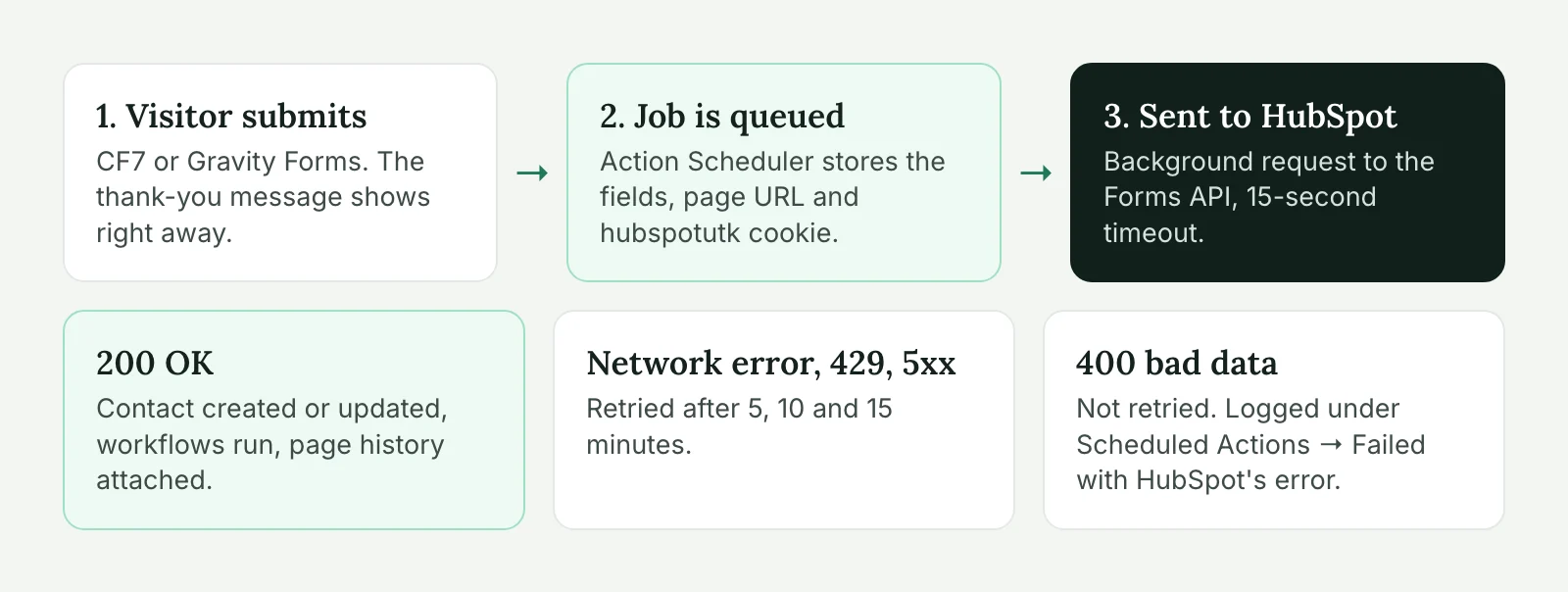
The request runs in the background through Action Scheduler, which ships with WooCommerce and many other plugins (or you can bundle it). The visitor gets their “thank you” message right away instead of waiting for HubSpot’s response. Without Action Scheduler, the code falls back to sending immediately.
Failed sends throw an exception. Action Scheduler records the message, so every failure shows up under Tools → Scheduled Actions → Failed with HubSpot’s exact response. That’s the log screen agencies ask for most once they’ve lost a lead.
Only network errors, rate limits and server errors are retried, at 5, 10 and 15 minutes. A 400 means the data is wrong (a missing required field, an invalid email), and sending it again won’t help.
Field names on the left are HubSpot’s internal property names (firstname, not “First name”). You’ll find them in HubSpot under Settings → Properties. Custom properties use whatever internal name was set when they were created.
We kept the form mapping in constants to keep the example short. On real projects, we move it into an ACF options page so the agency can connect a new form without a deploy. For more on the same retry and logging pattern, see integrating third-party APIs with WordPress.
Syncing CRM data that isn’t a form
Orders, registrations and account changes go through the CRM API instead. You’ll need a HubSpot private app with the right scopes (for contacts, crm.objects.contacts.write) and its access token. Keep the token in wp-config.php, never in the database or the theme:
define( 'AHB_HUBSPOT_TOKEN', 'pat-na1-...' );Then update the contact by email when something happens in WordPress. This example records a customer’s last WooCommerce order date and lifetime order count:
add_action( 'woocommerce_order_status_completed', function ( $order_id ) {
	$order = wc_get_order( $order_id );
	if ( ! $order || ! $order->get_billing_email() ) {
		return;
	}

	$properties = array( 'last_order_date' => current_time( 'Y-m-d' ) );
	if ( $order->get_customer_id() ) {
		$properties['order_count'] = wc_get_customer_order_count( $order->get_customer_id() );
	}

	$body = array(
		'inputs' => array(
			array(
				'idProperty' => 'email',
				'id'         => $order->get_billing_email(),
				'properties' => $properties,
			),
		),
	);

	wp_remote_post(
		'https://api.hubapi.com/crm/v3/objects/contacts/batch/upsert',
		array(
			'headers' => array(
				'Authorization' => 'Bearer ' . AHB_HUBSPOT_TOKEN,
				'Content-Type'  => 'application/json',
			),
			'body'    => wp_json_encode( $body ),
			'timeout' => 15,
		)
	);
} );
last_order_date and order_count are custom contact properties you’d create in HubSpot first. In production, wrap the request in the same queue and retry logic as the form example. Order hooks fire during checkout, and checkout is the last place you want a slow third-party request. Guest orders have no customer ID, so the code skips the count for them.
Two-way sync, where HubSpot changes flow back into WordPress, needs HubSpot webhooks and an endpoint on the site that verifies their signature. It’s a bigger job, usually 20 hours or more, and worth it only when someone actually edits the same data in both places. We cover the queue, retries and signature checks in syncing WordPress with external data.
Tracking and consent
The HubSpot tracking code is what connects a lead to the pages they read before converting. Without it, the hutk in the form payload is empty and HubSpot only knows the email. Add it once, site-wide, through the theme’s footer or Google Tag Manager. Don’t add it twice. We regularly find it loaded by the official plugin and by GTM on the same site, which double counts page views.
For visitors in the UK and EU, the tracking cookie needs consent. You have two options. HubSpot’s own cookie banner works out of the box with its tracking code. If the site already has a consent tool (Cookiebot, CookieYes, Complianz), load the HubSpot script only after the visitor accepts marketing cookies, and turn HubSpot’s banner off so visitors don’t see two. Test this in a private window: decline cookies, then check in the browser’s dev tools that no hubspotutk cookie is set.
A side effect worth telling the client about: when a visitor declines, the form submission still reaches HubSpot through the API, just without page history. That’s expected, not a bug.
Common failures and how to debug them
These cover most of the “HubSpot stopped getting leads” messages we get.
Someone renamed a form field. An editor changes your-email to email-address in CF7, and the email field goes to HubSpot empty. HubSpot rejects it with a 400. The failed actions log shows the error right away. Without a log, you find out weeks later.
The HubSpot form changed. The marketing team adds a required field to the HubSpot form, and every API submission that doesn’t include it fails. Agree with the client that the hidden “API” forms in HubSpot aren’t edited without telling you.
Wrong portal ID or form GUID after a staging copy. A staging site sends real test leads into the client’s production HubSpot. Keep the IDs in environment-specific config, or disable the bridge when wp_get_environment_type() isn’t production.
A caching or security plugin blocks the cookie. If hutk is always empty even with consent given, check the page source for the tracking script and the browser for the cookie. Some caching setups strip cookies on cached pages, and some security plugins block outgoing requests by domain.
Server can’t reach HubSpot. Rare, but it happens on hosts with strict outbound firewalls. Test with WP-CLI from the server:
wp eval 'var_dump( wp_remote_retrieve_response_code( wp_remote_get( "https://api.hsforms.com" ) ) );'Any HTTP code means the connection works. A WP_Error means it doesn’t, and the host needs to allow the domain.
When to bring in a developer
An agency team can set up the official plugin and the tracking code on its own. Bring in a developer when leads go missing, when you need data that isn’t a form, when the site’s speed scores drop after HubSpot went in, or when the client asks for anything that sounds like “sync”. A custom bridge like the one above is usually 6 to 15 hours with testing. Order sync or two-way sync falls into the 15 to 40 hour range we give for custom plugin development with external APIs.
If a client’s HubSpot setup needs fixing, tell us what’s connected and what’s going wrong. We’ll look at it and tell you whether it’s a one-hour fix or a rebuild.
WordPress HubSpot integration FAQ
No. The official plugin is the quickest option for simple sites that use HubSpot forms. If the site uses Contact Form 7 or Gravity Forms, or needs to send orders and other data, a small custom integration through the HubSpot API is more reliable and lighter.
Yes. Hook into the form’s submission action and send the fields to the HubSpot Forms API with the visitor’s hubspotutk cookie. The lead then shows up in HubSpot as a normal form submission, with page history and workflows.
The usual causes are a renamed form field, a new required field on the HubSpot form, a wrong portal ID or form GUID, or a failed request that nobody logged. Queue the submissions and log failures so you can see the exact error HubSpot returned.
The default embed loads HubSpot’s form script as the page loads, which can add noticeable blocking time on mobile. Load the script only when the form scrolls near the viewport, and reserve the form’s height to avoid layout shift.