WordPress migration service for agencies
Our WordPress migration service moves client sites between hosts, or from other platforms to WordPress, under your brand.
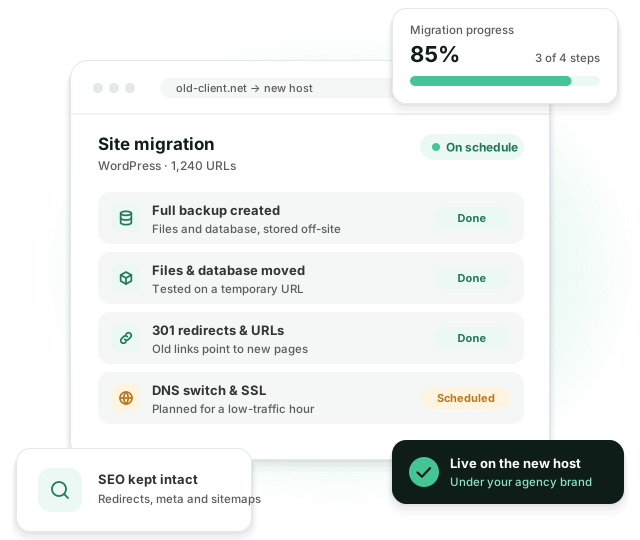
Full backups before every step, a redirect map for every changed URL, and DNS switched at a quiet hour. Rankings, data and email keep working.
What usually goes wrong in a migration
-
 The site goes down during the move
-
 Search rankings drop after launch
-
 Old links and images break
-
 Orders, users or form entries go missing
-
 Email stops working after the DNS switch
-
 Moving off Wix or Squarespace takes specialist work
A good migration is one your client’s visitors never notice.
What a migration includes
A planned move, not a one-click plugin export. Migration plugins are fine for a test copy. For a live client site we want a written plan and a way back if something goes wrong.
Host to host
Between shared hosting, managed WordPress hosts, VPS and cloud servers.
Other platforms to WordPress
Content moved from Wix, Squarespace, Joomla, Drupal and custom CMSs.
WooCommerce stores
Products, customers and order history moved without losing data.
SEO
301 redirects, meta data, sitemaps and internal links kept, so rankings carry over.
Domain, DNS and SSL
DNS planned for a quiet hour, SSL set up and mail records left intact.
Checks after go-live
Forms, checkout, logins and key pages tested again on the new server.
Platforms we migrate from
Each platform has its own export problems. Moving a very large site? Read how we migrate large websites to WordPress.
Another WordPress host
WP Engine, Kinsta, Cloudways, SiteGround, shared hosting or a VPS. The simplest move, but PHP versions, caching and staging setups differ between hosts, and that’s where things break.
Webflow
CMS collections become custom post types, and interactions are rebuilt. Webflow’s code export leaves CMS content out, so collections come over through CSV or the API.
Wix
Wix has no real export. Blog posts come over through RSS or the API, and pages are rebuilt in WordPress.
Squarespace
Pages and blog posts export to WordPress format. Products, galleries and some blocks need manual work.
Joomla, Drupal and custom CMSs
Content, users and taxonomies are moved at the database level, then cleaned up in WordPress.
Host move or platform move?
Two very different jobs that both get called a migration.
| Host to host | Platform to WordPress | |
|---|---|---|
| What moves | Files, database, media and email records | Content, then the design rebuilt as a theme |
| URLs | Usually stay the same | Usually change, so every one needs a redirect |
| Main risk | Downtime and broken email | Lost content and lost rankings |
| Design | Stays as it is | Rebuilt, often from a new Figma file |
How our WordPress migration service works
The same steps for a 10-page brochure site and a 5,000-product store. Only the time changes.
-
1. Inventory
We crawl the current site and export every URL, page title, redirect and image. This list is what we check against at the end.
-
2. Plan and quote
You get a written plan and a fixed quote. If URLs change, you also get a redirect map, one old URL to one new URL.
-
3. Move and test
Full backup first. Then files, database and media go to the new server, and we test on a temporary URL: forms, checkout, logins, search.
-
4. Prepare the switch
We lower the DNS TTL a day ahead and agree on a quiet hour with you. Mail records are copied over before anything changes.
-
5. Switch
DNS goes over, SSL is checked, and we re-crawl the live site against the inventory from step 1.
-
6. Watch for 7 days
We check Search Console, 404 logs and forms for a week. Anything caused by the move is fixed at no extra cost.
What we check before calling it done
Our go-live checklist, shortened. We run it twice: on the temporary URL, and again after the DNS switch.
- Every URL from the old site returns 200 or a 301 to the right page
- No redirect chains or loops
- Titles, meta descriptions and canonical tags match the old site
- XML sitemap regenerated and submitted in Search Console
- Images load from the new domain, not the old host
- Forms deliver, and checkout completes a test order
- SSL valid, no mixed-content warnings
- MX, SPF and DKIM records unchanged, email still arrives
- Analytics and tag manager fire on the new server
Example: moving a 480-page site off Webflow
A typical platform migration for a design agency’s B2B client. The agency kept the client relationship. We never spoke to the client directly.
-
Scope
480 pages, 3 CMS collections (blog, case studies, team) and about 1,100 URLs in the index.
-
Build
The agency’s designer handed over the Figma file. We built the theme, set up custom post types and imported the collections through the Webflow API.
-
Redirects
Webflow’s /post/ URLs moved to /blog/. 312 redirects, each tested before launch.
-
Launch
DNS switched on a Sunday morning. During the 7-day check we fixed 4 broken image links in old posts that pointed at Webflow’s CDN. Search Console showed no new errors.
One site or many
Migration FAQ
We test on the new server first and switch DNS at a quiet hour, so downtime is minimal or none.
Not if the redirects are right. We keep URLs where we can and set up a 301 for every one that changes. After launch we submit the new sitemap and watch Search Console for a week. On platform moves a short dip can happen while Google recrawls the site. A drop that lasts almost always means a missing redirect, and that’s exactly what the 7-day check is for.
Yes. We move the content into WordPress and rebuild the design as a WordPress theme.
We watch the site for 7 days: 404s, forms, checkout and Search Console. Anything caused by the move is fixed at no extra cost. Email records are copied before the DNS switch, so mail keeps working.
Yes, or a full backup and a database export. For the switch we also need DNS access, or someone on your side who can change the records at the agreed time.
Related services
Related reading
Moving a client site soon?
Tell us about the site and the new host. We’ll send a migration plan and a quote.